
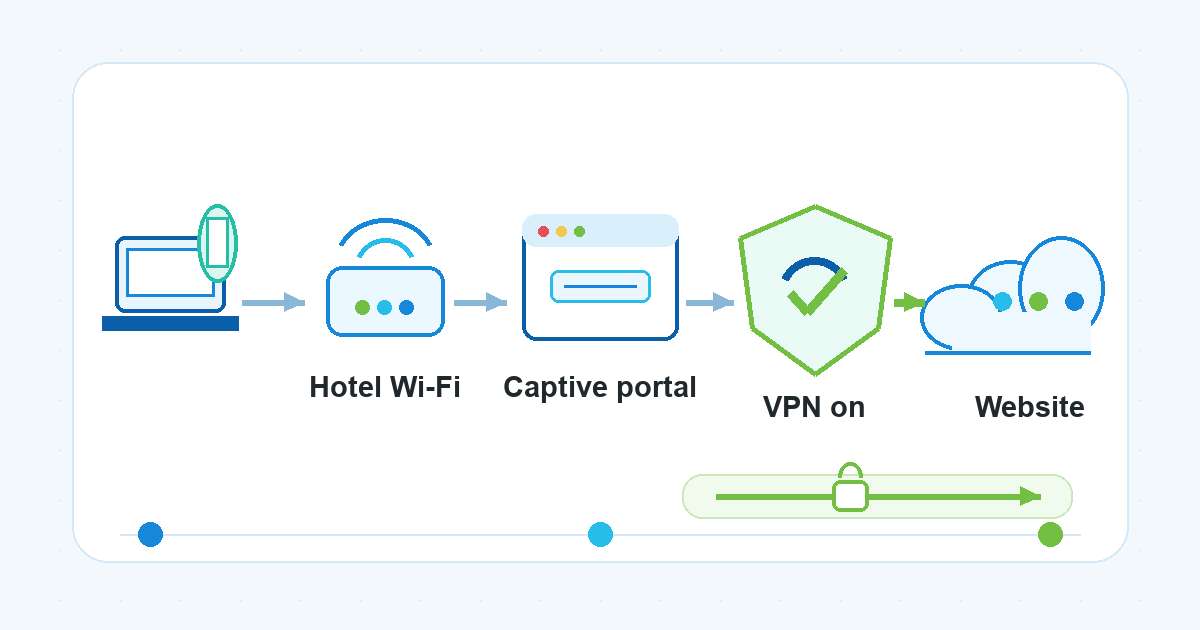
Hotel Wi-Fi often has one awkward moment: you connect to the network, open your VPN, and nothing works because the hotel still needs you to sign in. That sign-in screen is usually a captive portal. Until the portal grants internet access, your VPN app may not be able to reach its server.
The safest practical sequence is simple: identify the official hotel network, complete the portal with minimal exposure, turn VPN protection on, then use sensitive accounts only after your browser shows HTTPS and your VPN is connected.
Why your VPN may not connect before the hotel portal
A hotel wifi login page is not a normal website visit. It is part of the network’s access process. Hotels, airports, cafes, and other public locations often use captive networks that ask guests to enter a room number, access code, email address, or accept terms before the network opens internet access.
That creates a timing problem. A VPN needs internet access to create its protected tunnel. If the hotel network has not released your device from the captive portal yet, the VPN connection can fail, hang, or keep retrying.
This does not mean the VPN is useless on hotel Wi-Fi. It means the order matters:
- Join the real hotel network.
- Complete the captive portal login.
- Connect your VPN.
- Confirm the site or app you use is protected by HTTPS and normal account security.
Step 1: Make sure you are joining the official hotel network
Before you think about the VPN, confirm the network name with the hotel. Use the name printed at the front desk, in the room information, or in the hotel’s official guest instructions. Do not guess from a list of similar Wi-Fi names.
This matters because public Wi-Fi risk is not only about open networks. Spoofed networks can imitate a real hotel or public venue name. If you join the wrong network, you may be handing your traffic to someone who wants to intercept it.
A good quick check:
- Ask the front desk for the exact network name.
- Avoid networks with suspicious duplicates, extra words, or strange spellings.
- Do not auto-join a network just because your device remembers something nearby.
- If you are unsure, disconnect and verify before entering any portal details.
Step 2: Complete the captive portal before sensitive browsing
After you join the official network, wait for the sign-in page to appear. On some devices, the portal opens automatically. On others, you may need to open a browser window and visit a simple website to trigger it.
If you are wondering how to get hotel wifi login page access without risky workarounds, keep it basic:
- Open your browser and try a simple non-sensitive page.
- If you use an iPhone or iPad, check the Wi-Fi settings screen for the network and wait for the login screen.
- If the page still does not appear, try opening
http://captive.apple.comin a browser. This is commonly used to trigger Apple’s captive network check. - If you previously set custom DNS servers, return DNS to automatic temporarily so the hotel portal can appear.
Use the portal only for the access step. Avoid opening email, banking, work dashboards, cloud files, or other sensitive services while the portal is unfinished.
Step 3: Turn VPN protection on right after the portal works
Once the hotel confirms access and the internet starts working, connect your VPN before doing sensitive work. For VPN Satelites readers who use VPN Unlimited by KeepSolid, this is the point where the VPN belongs in the workflow: after the portal is complete and before account-heavy browsing.
This is a practical public wifi security vpn habit, not a magic shield. A VPN can help protect traffic on an unsecured or public network by sending it through a protected tunnel, but it does not make a fake website legitimate, stop every phishing attempt, or replace account protection.
After connecting the VPN, check three things:
- Your VPN app says it is connected.
- Your browser shows
https://and the lock indicator on sites where you sign in. - Your important accounts still use strong passwords and two-factor authentication where available.
If the hotel Wi-Fi disconnects after the VPN turns on, reconnect to the official hotel network, make sure the portal session is still active, then try the VPN again.
Step 4: Keep the first few minutes low-risk
Even after the portal is complete, take a minute before opening sensitive accounts. Public Wi-Fi is convenient, but shared networks can still carry risks such as spoofed access points, weak network settings, eavesdropping on unprotected traffic, or people nearby watching what you type.
Use this short checklist before email, banking, client dashboards, or admin panels:
- Confirm you are still on the official hotel network.
- Confirm the VPN is connected.
- Confirm the site uses HTTPS.
- Avoid “remember me” on shared or high-risk travel networks.
- Keep your operating system, browser, and security tools updated.
- Turn on two-factor authentication for important accounts.
- Watch for fake sign-in pages, urgent payment prompts, and unusual account warnings.
The FTC notes that HTTPS has made public Wi-Fi safer than it used to be for many websites, but scam websites can still use HTTPS too. The lock icon tells you the connection to that site is encrypted. It does not prove the site itself is trustworthy.
Is hotel Wi-Fi safe?
The careful answer to “is hotel wifi safe” is: sometimes it is reasonable to use, but you should treat it as a shared public network.
Hotel Wi-Fi can be fine for basic browsing after you join the correct network and confirm HTTPS. It becomes riskier when you are signing in to financial accounts, handling work data, using admin dashboards, or connecting automatically without checking the network name.
Use the hotel network for what you need, but add layers:
- Use the official network, not a lookalike.
- Complete the captive portal first.
- Turn VPN protection on before sensitive use.
- Keep HTTPS, two-factor authentication, and software updates in place.
- Disconnect or forget the network when you no longer need it.
This layered approach is more realistic than treating any one tool as a full security answer.
What if the portal keeps coming back?
Hotel networks sometimes expire sessions, especially overnight or after a device sleeps. If the captive portal returns, pause sensitive activity and repeat the same sequence:
- Disconnect the VPN.
- Complete the hotel portal again.
- Reconnect the VPN.
- Resume sensitive browsing only after the VPN and HTTPS checks pass.
If the portal appears repeatedly, ask the hotel whether the access code, room number, or device limit has changed. Do not try to bypass hotel access controls or network rules.
What to turn off when you leave
When you check out or stop using the network, clean up the connection:
- Turn off auto-join for the hotel network if you do not expect to use it again.
- Forget the network on devices that do not need to reconnect.
- Turn off Wi-Fi when you are not using it in public places.
- Avoid saving the portal login if your device offers to remember it.
These steps reduce the chance that your device reconnects later to an old, weak, or lookalike network.
FAQ
Should I connect my VPN before or after the hotel Wi-Fi login page?
In most hotel captive portal situations, connect to the official hotel Wi-Fi and complete the portal first, then turn the VPN on. If the portal has not granted internet access yet, the VPN may not be able to connect.
What is a captive portal login?
A captive portal login is the sign-in or terms page that appears before some public Wi-Fi networks let your device access the internet. Hotels may use it to ask for a room number, access code, email address, or acceptance of network terms.
Why does the hotel Wi-Fi page not appear?
The portal may fail to appear because the browser did not trigger it, the device is using custom DNS settings, the network session is stuck, or the hotel system is having trouble. Try opening a browser, visiting http://captive.apple.com, returning DNS to automatic, or asking the hotel for the correct network instructions.
Can I use banking or work apps on hotel Wi-Fi?
You can reduce risk by using the official hotel network, completing the portal, connecting your VPN, checking HTTPS, and using strong account security. For highly sensitive work, follow your employer’s security policy. A VPN is one layer, not permission to ignore account, device, legal, or workplace requirements.
Does a VPN make hotel Wi-Fi completely safe?
No. A VPN can help protect your connection on public Wi-Fi, but it does not make every website trustworthy, stop every scam, guarantee access, or replace HTTPS, two-factor authentication, software updates, and careful account habits.
The simple hotel Wi-Fi order to remember
If the hotel portal appears before your VPN connects, do not fight the order. Use it.
Join the official hotel network, complete the portal, connect VPN protection, confirm HTTPS, then open the accounts that matter. That sequence keeps the captive portal step in its proper place and gives your VPN a working internet connection before you rely on it.