
Checking a balance from an airport lounge, paying a card from a hotel room, or approving a transfer from a coworking space can feel routine until the network, device, or location changes. For Latin America-based travelers, remote workers, and cross-border visitors, online banking while traveling is less about one magic setting and more about a few steady habits.
A VPN can be part of that routine, especially on networks you do not control. It is not a way to override your bank’s rules, avoid verification, or make financial activity anonymous. Think of it as one layer in a wider travel setup that also includes strong passwords, two-factor authentication, updated devices, and careful network choices.
Why banking feels different when you move between countries
Financial apps and websites often pay attention to unusual sign-in patterns. A new country, a new device, a new browser, a different mobile carrier, or repeated network changes can all lead to extra checks. That does not always mean something is wrong. It may simply mean the service wants more confidence that the account owner is the person signing in.
Travel also changes your network environment. At home, you may use a private Wi-Fi network or a mobile plan you trust. On the road, you may rely on:
- hotel Wi-Fi with shared access;
- airport and bus terminal networks;
- cafe or restaurant Wi-Fi;
- coworking spaces;
- short-term rentals;
- local mobile data;
- hotspot sharing from another device.
Some of these networks are fine for casual browsing. Banking deserves a stricter routine because the account itself matters.
Is it safe to do online banking on public wifi?
The honest answer to “is it safe to do online banking on public wifi” is: it depends on the network, the device, the site connection, and your account protections. Public Wi-Fi is not automatically dangerous, but it gives you less control than a private network.
Before signing in, check the basics:
- Use the official banking website or app you normally use.
- Confirm the browser shows HTTPS before entering credentials.
- Avoid links from emails, messages, ads, pop-ups, or QR codes when opening a financial account.
- Do not bank from a shared or borrowed device.
- Keep your device operating system, browser, and banking app updated.
- Turn off automatic connection to unknown open networks.
- Use strong authentication, preferably through an authenticator app or secure device prompt when your bank supports it.
If the network feels improvised, unstable, or suspicious, wait for a better connection. Urgent banking tasks are still worth slowing down for a few minutes.
Where a VPN helps, and where it does not
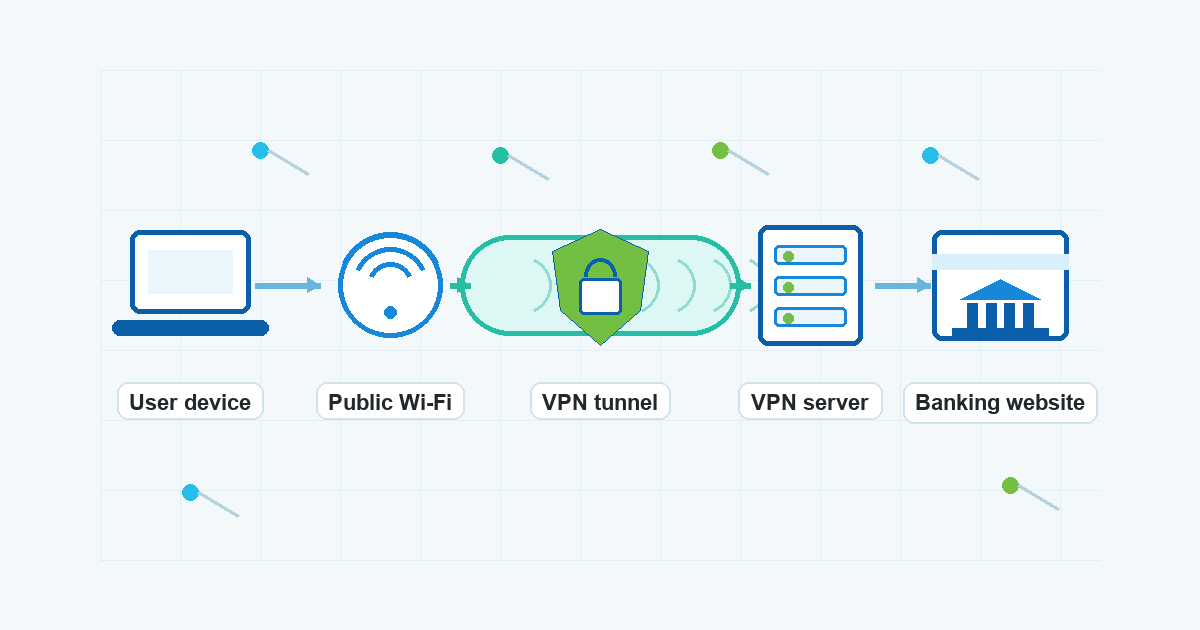
When you use a VPN on an untrusted network, your device sends traffic through an encrypted tunnel to a VPN server before it reaches the wider internet. That can reduce exposure on the local network, especially in places where many strangers share the same Wi-Fi.
That is the practical reason many travelers use VPN for online banking from hotels, cafes, airports, and coworking spaces. If VPN Unlimited by KeepSolid is already part of your travel setup, it can fit into this layer of protection as a neutral, everyday habit before you open sensitive accounts.
A VPN is not a replacement for your bank’s security system. It cannot promise that a login will be accepted, that a transaction will go through without review, or that your account will never need extra verification. Your bank may still ask for a code, a device confirmation, a password reset, or direct contact through official support.
The best framing is simple: a VPN can help protect the connection path on networks you do not control. Your bank still controls account access, verification, and transaction review.
A practical routine before online banking abroad
Online banking abroad is easier when you prepare before the trip instead of troubleshooting from a noisy airport or unfamiliar cafe.
Before leaving:
- Make sure your bank has your current contact methods.
- Confirm you can receive verification codes or prompts while away.
- Save official support channels in your password manager or contacts.
- Update your banking app, browser, and operating system.
- Check that your VPN app is installed, signed in, and working.
- Bring a backup authentication method if your bank allows one.
- Avoid relying on SMS only if you may change SIM cards or lose mobile coverage.
While traveling:
- Prefer your own mobile data or a trusted private network for sensitive tasks.
- If you must use public Wi-Fi, connect your VPN before opening financial accounts.
- Use one device you control rather than hotel lobby computers or shared tablets.
- Log out when finished, especially in browsers.
- Avoid making financial decisions while rushed, tired, or distracted.
These habits will not remove every inconvenience, but they reduce avoidable mistakes.
Keep your location pattern as calm as possible
Moving between countries can make your connection pattern look less familiar. Travelers sometimes switch between local Wi-Fi, roaming data, local SIM cards, hotspot devices, and shared coworking networks in the same day. From the bank’s perspective, that can look unusual.
A VPN should not be used to misrepresent yourself to a bank or evade checks. The safer habit is consistency and transparency:
- Use your normal device when possible.
- Avoid jumping between many networks during one banking session.
- Do not repeatedly retry failed logins from different connections.
- If verification appears, follow the bank’s instructions.
- If access problems continue, contact the bank through official channels.
If your bank has travel guidance, follow it. Some banks may have specific recommendations for travel notifications, verification methods, or app access. Those rules vary, so avoid relying on generic advice when your bank gives direct instructions.
Public Wi-Fi banking checklist for travelers
Use this quick checklist before banking on public wifi:
- Are you on the official app or typed-in website, not a link from a message?
- Is your device fully updated?
- Are you using a private device, not a shared one?
- Is the network one you intentionally joined?
- Is your VPN connected before sign-in?
- Is HTTPS visible in the browser if you are using the web?
- Is two-factor authentication available and working?
- Can you pause the task until you have a better network if something feels off?
If the answer to several of these is no, wait. A small delay is usually better than handling sensitive account activity in a poor environment.
What to do if your bank asks for extra verification
Extra verification while traveling is not unusual. Do not try to force repeated logins from multiple networks. That can make the session messier.
Instead:
- Read the prompt carefully.
- Use only the verification method your bank provides.
- Avoid third-party “help” pages or unofficial phone numbers.
- Contact the bank through the official app, website, card number, or saved support channel.
- Explain that you are traveling if the bank asks why the activity looks different.
A VPN does not remove the need to prove that you are the account owner. It is better to treat verification as part of safe account use, not as a problem to get around.
A safer travel setup for financial tasks
For many travelers, the best setup is boring and repeatable:
- one trusted phone or laptop;
- updated system and apps;
- password manager with unique passwords;
- two-factor authentication that works abroad;
- VPN turned on before using untrusted Wi-Fi;
- official banking apps and typed-in URLs;
- no shared devices for financial accounts;
- a backup plan for contacting the bank.
VPN Satelites readers do not need alarmist advice. They need habits that still work after a delayed flight, a weak hotel router, or a last-minute country change. Keep the routine simple enough that you will actually follow it.
FAQ
Should I use a VPN every time I check my bank account while traveling?
Use a VPN when you are on a network you do not control, such as hotel, airport, cafe, or coworking Wi-Fi. On trusted mobile data or a private network, the decision depends on your own setup and your bank’s guidance. A VPN is one useful layer, not a guarantee of access or approval.
Can a VPN stop my bank from asking questions about my login?
No. Your bank may still ask for extra verification when your device, location, network, or behavior looks different from usual. Follow the bank’s official instructions and contact support through verified channels if needed.
Is mobile data better than public Wi-Fi for banking?
Mobile data can be a good option because it avoids shared public Wi-Fi, but it still depends on your device, carrier connection, account protections, and the sites or apps you use. Keep your device updated and use strong authentication either way.
Should I change VPN locations during a banking session?
Avoid unnecessary network changes while signed in. If your connection fails or the bank asks for verification, follow the prompt or contact the bank. Repeated retries from different networks can create more friction.
Does a VPN make online banking anonymous?
No. Your bank still knows you are signing in to your account, and it may use many signals beyond your network connection. A VPN can help protect traffic on the local network path, but it does not make banking activity anonymous.
Bottom line
Safer banking while traveling is about reducing avoidable exposure and staying ready for normal verification. Use trusted networks when you can. If you need to bank from public Wi-Fi, connect your VPN first, use your own updated device, open the official app or website, and keep two-factor authentication available.
That routine will not guarantee friction-free access, and it should not replace your bank’s instructions. It gives you a calmer, more consistent way to handle financial tasks while moving between countries.