
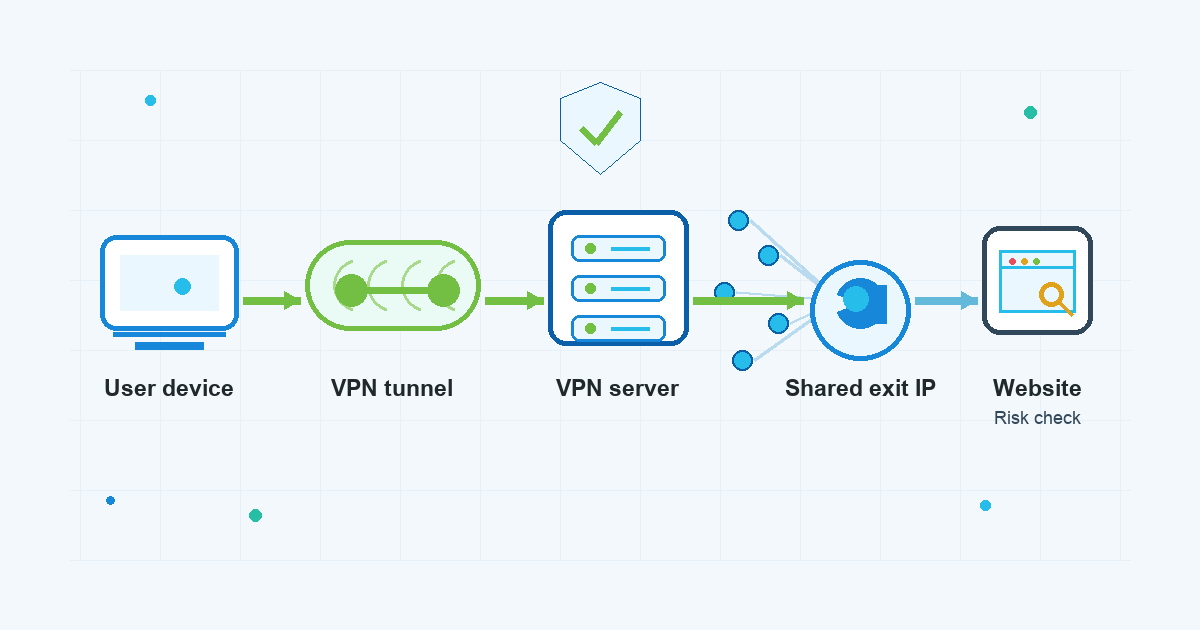
When a website shows an extra login check, a proxy warning, or one more CAPTCHA while your VPN is on, it can feel personal. In many cases, it is not. The site may simply be reacting to the network address it sees.
That is where the phrase vpn ip reputation comes in. A VPN changes the IP address visible to websites by routing your connection through a VPN server. If many people use the same server address, that address can build a history. Some websites and anti-abuse systems treat that history as one factor when deciding whether to allow a request normally, ask for verification, or block the connection.
This does not mean you did anything wrong. It also does not mean a VPN is broken. It usually means the website is using risk checks that look beyond your password and browser session.
What is VPN IP reputation?
IP reputation is a website’s estimate of how risky traffic from an IP address looks. Websites may use it to reduce spam, credential stuffing, scraping, payment fraud, account takeover attempts, and other automated abuse.
For a normal home connection, the visible IP address often maps to one household or one small group of users. With a VPN, many unrelated people can appear to a website from the same server address. That visible address is often called an exit IP because it is the point where VPN-routed traffic exits toward the website.
If a website sees unusual behavior from that address, it may lower trust in future visits from the same address. The next person using that route may then see an extra check even if their own behavior is ordinary.
Why a shared VPN IP can attract more checks
A shared vpn ip is common in consumer VPN use. Shared addresses help separate one person’s browsing from a single fixed network address, but they also mean many users may appear from the same place online.
From the website’s side, that can look unusual:
- Many accounts may log in from the same IP address.
- Traffic volume from that address may be higher than a typical home connection.
- Some users may trigger abuse filters before you ever use that same route.
- The IP address may appear in commercial proxy, hosting, or VPN-related datasets.
- The website may notice a sudden country or network change compared with your previous account activity.
None of these signals proves that a visitor is unsafe. They are risk signals. A cautious website may respond by asking for a CAPTCHA, sending an email verification, showing a login warning, limiting certain actions, or refusing the connection.
How a website detects VPN traffic
When a website detects vpn usage, it is usually combining several clues. The exact method varies by website, and most platforms do not publish their full anti-abuse logic.
Common signals may include:
- The IP address belongs to a data center, hosting provider, or known VPN server range.
- Many unrelated sessions appear from the same IP address.
- The IP address has a history of spam, scraping, suspicious logins, or automated requests.
- Your account usually appears in one region, then suddenly appears somewhere far away.
- Browser, cookie, device, and login-session details do not match the expected pattern.
- Request timing looks automated or unusually repetitive.
This is why a VPN warning can appear even when your connection itself is working. The site is not necessarily reading your VPN app. It may simply be judging the traffic path and account context.
What “vpn proxy detected” usually means
The message vpn proxy detected is often a broad warning. A website may use the word “proxy” for several types of routed traffic, including commercial VPNs, public proxies, data-center connections, hosting networks, and other traffic sources it wants to review more carefully.
The wording can be frustrating because it rarely explains the exact reason. It may mean:
- the visible IP address is associated with VPN or proxy infrastructure;
- too many users recently appeared from the same address;
- the address has a poor reputation in the site’s anti-abuse tools;
- the site has a policy that restricts some VPN or proxy traffic;
- your account activity changed in a way that triggered a security check.
The practical response is to treat the message as a site-side risk check, not as a reason to turn off every privacy habit immediately.
Why a VPN CAPTCHA appears
A vpn captcha usually appears because the website wants to separate a real person from automated traffic. VPN users may see more CAPTCHA prompts because shared exit IPs can look busier than normal residential addresses.
CAPTCHAs can also show up when:
- you refresh the same page many times;
- you switch regions or servers repeatedly;
- cookies are blocked or cleared between visits;
- the site already has a high-risk score for the visible IP address;
- your browser privacy settings reduce signals the site normally uses to recognize a returning user.
It is possible for a CAPTCHA to be annoying and still be a normal part of the site’s abuse-prevention system.
What to do when a site flags your VPN connection
Start with the lowest-risk steps. The goal is to resolve the practical issue without weakening basic account and privacy hygiene more than necessary.
1. Pause and read the warning
Do not rush through repeated login attempts. If the site is a bank, work tool, email account, payment service, or admin dashboard, treat the warning seriously. Check whether it is asking for normal verification, reporting a suspicious login, or blocking access under its own rules.
If the alert says your account may be at risk, follow the account-security steps from that service. That may include confirming an email, checking recent sessions, changing a password, or enabling two-factor authentication.
2. Try a different VPN server or region
If the website is only reacting to the current exit IP, switching to another VPN server may give you a different visible address and a different reputation history. Avoid rapid switching across many distant regions, especially while logged into sensitive accounts, because sudden location changes can create more risk signals.
For everyday browsing, choose a location that makes sense for what you are doing. For accounts tied to your normal country or workplace region, a nearby server may look less unusual than a route on the other side of the world.
3. Keep your browser session consistent
Some websites combine IP reputation with cookies, device checks, and session history. If you clear cookies, use a new browser profile, change VPN regions, and log in from a new device at the same time, the site may see several changes at once.
When you need reliability for a trusted account, keep the basics steady:
- use the same browser profile for that account;
- avoid unnecessary region changes during login;
- keep two-factor authentication enabled;
- do not retry failed logins over and over;
- update your password manager entry if a password has changed.
This does not mean you need to abandon privacy settings. It means that consistency can reduce avoidable account-risk signals.
4. Separate sensitive logins from casual browsing
If you are signed into a financial, work, or email account, be more conservative. A VPN can help protect traffic on untrusted networks, but it does not replace strong passwords, two-factor authentication, secure device settings, or the rules of the service you are using.
For casual browsing, a CAPTCHA may be a small inconvenience. For a sensitive account, slow down and verify that the prompt is legitimate before continuing.
5. Respect service terms and local requirements
Some websites restrict VPN or proxy traffic for fraud prevention, licensing, compliance, or account-security reasons. A VPN service cannot guarantee that every website will accept every VPN connection. If a site says VPN or proxy traffic is not allowed for a specific action, follow the site’s terms and applicable local rules.
What a VPN can and cannot change
A VPN changes the network route between your device and the internet. It can make the website see the VPN server’s IP address instead of your local network’s address.
A VPN does not erase every other signal. Websites may still recognize:
- your logged-in account;
- cookies and browser storage;
- device or browser characteristics;
- payment or shipping details you provide;
- behavior patterns within the account;
- security settings such as two-factor authentication.
This is why IP reputation is only one part of the picture. It can explain a warning, but it is rarely the only thing a website considers.
A practical way to think about VPN reputation checks
The simplest mental model is this: a VPN exit IP is a shared doorway. Most people using the doorway may be ordinary users, but the website cannot see every person separately from the IP address alone. If the doorway has recently been associated with heavy traffic or abuse, the site may ask the next visitor to prove they are human or verify their account.
That is inconvenient, but it is not automatically a privacy failure. VPN users can respond calmly: choose a sensible server, keep sensitive account sessions consistent, verify legitimate security prompts, and avoid repeated behavior that makes automated systems more suspicious.
The practical goal is to understand these tradeoffs without assuming that any VPN can make every website trust every connection. A good VPN habit is not just turning protection on. It is knowing what the tool changes, what it does not change, and how to react when a website adds an extra check.
FAQ
Does a VPN IP reputation warning mean my account is unsafe?
Not by itself. A warning may be based on the visible VPN exit IP, your recent login location, browser-session changes, or the website’s own anti-abuse rules. If the warning comes from a sensitive account, review it carefully and follow the site’s account-security steps.
Why do I see more CAPTCHA prompts with a VPN?
You may see more CAPTCHA prompts because many VPN users can share the same exit IP address. If that address has high traffic or a mixed reputation history, a website may ask for extra proof that you are a real person.
Should I turn off my VPN whenever a site blocks me?
Not automatically. First, read the warning, consider whether the account is sensitive, and try conservative troubleshooting such as choosing a nearby server or keeping your browser session consistent. For some services, you may need to follow their specific VPN or proxy rules.
Can switching VPN servers fix an IP reputation issue?
Sometimes it may help, because another server may use a different visible IP address with a different reputation history. It is not guaranteed, and rapid server switching can create its own account-risk signals on some websites.
Is VPN IP reputation the same as personal reputation?
No. IP reputation is about the network address the website sees. With a shared VPN server, that address may reflect activity from many users, not just you.