
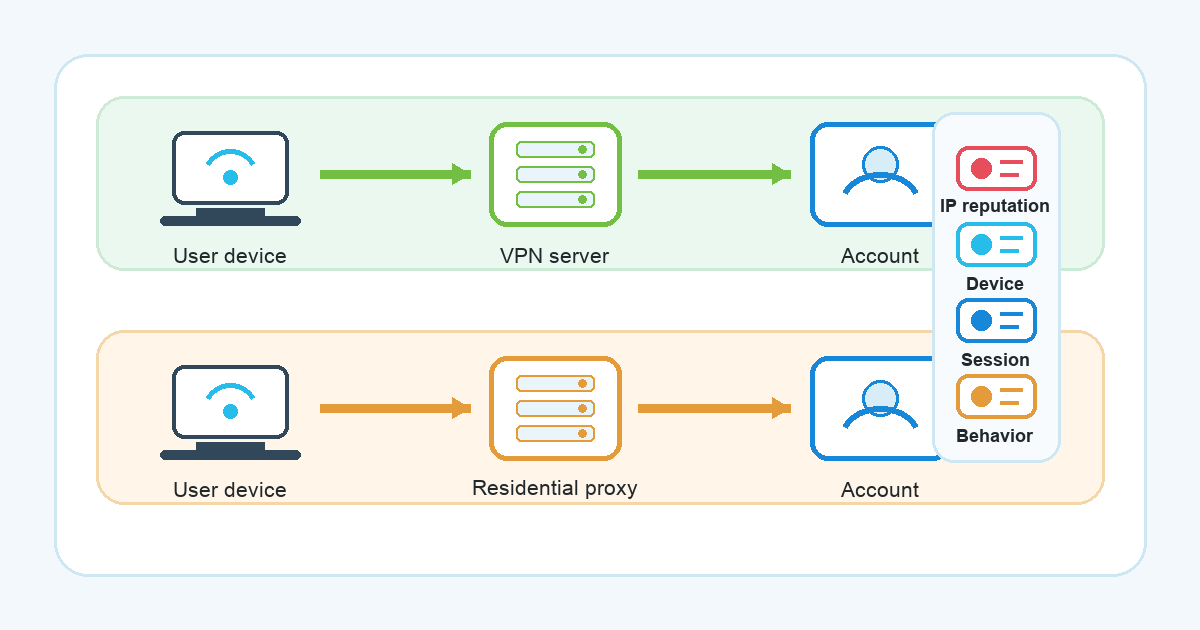
If you have ever seen an unexpected login check after changing networks, it is easy to blame one thing: the VPN, the proxy, the airport Wi-Fi, or the location that appeared on the screen. The reality is usually less tidy. Services often look at a mix of network, device, session, and behavior clues before deciding whether a login feels normal or suspicious.
That is why the question of residential proxy vs vpn needs a careful answer. A residential proxy and a VPN can both change the network route your traffic appears to use, but they are not the same tool, and neither one can guarantee account stability. IP reputation matters, but it is only one part of a larger risk picture.
This article looks at four published explanations from security and industry sources, then turns them into practical, claim-safe guidance for everyday VPN Satelites readers.
The short version: VPN vs proxy is not just a routing question
People often search for vpn vs proxy because both can sit between your device and a website or app. At a simple level:
- A VPN routes device traffic through a VPN server and is commonly used for privacy, safer public Wi-Fi use, and network-route control.
- A proxy typically routes traffic for a specific app, browser, or request path, depending on how it is used.
- A residential proxy uses an IP address associated with a residential or consumer network rather than a typical data center range.
That difference can affect how a service interprets the connection, but it does not decide the whole outcome. A login system may also consider whether your device is familiar, whether your cookies and session history match, whether the account behavior changed, whether the location jump is unusual, and whether the service has its own rules for VPN or proxy traffic.
So the safer question is not “Which tool avoids account checks?” It is “What signals can make a login look unusual, and how can I keep my normal usage consistent without breaking rules?”
What the FBI page shows about residential proxy risk
The FBI’s 2026 page on residential proxy networks describes how these networks may involve consumer or IoT devices and may be used in abusive activity such as fake account creation, stolen-credential logins, brute-force attempts, and other cybercrime patterns.
That does not mean every residential proxy use is criminal. It does explain why many platforms and security teams treat unclear residential proxy traffic with caution. From the service side, residential-origin traffic is not automatically trustworthy just because it looks like it came from a home network.
For an everyday user, the lesson is straightforward: do not assume a residential IP is a cleaner or safer answer for account stability. If a tool is marketed around avoiding detection, hiding automation, or making account activity look like it comes from somewhere else, that is a warning sign. It can put your accounts, compliance obligations, or personal data at risk.
VPN Satelites readers should keep the purpose clear. A VPN can be part of legitimate privacy and network-security hygiene, especially on networks you do not fully trust. It should not be treated as a promise that every website or app will accept every login without extra checks.
What GreyNoise shows about IP reputation limits
GreyNoise’s article on the “rotation economy” explains a problem for defenders: when residential IPs rotate across large pools, static reputation feeds can be less complete. A simple blocklist or allowlist may not capture the full risk picture.
This is important for users because it cuts both ways. A clean-looking IP address does not automatically make an account action look normal. A previously abused IP address can be a problem, but so can a sudden change in country, an unfamiliar device, a missing cookie, a new browser fingerprint, or account behavior that does not match your history.
In other words, ip reputation is one input, not a magic score that decides everything. A login system may ask:
- Is this IP address associated with suspicious traffic or known abuse?
- Is the network type expected for this account?
- Does the location match recent account history?
- Is the device, browser, or app session familiar?
- Is the user behavior normal for this account?
- Do the service’s own terms or risk rules allow this kind of access?
That is why switching from one network route to another may not stop a review prompt. It can even create more friction if the change makes your login look unusual.
What IPQualityScore shows about reputation checks
IPQualityScore’s IP reputation material describes the kinds of inputs that may appear in fraud and risk scoring, including proxy or VPN detection, ASN ownership, abuse history, device fingerprinting, transaction patterns, and other behavioral indicators.
For a user, an ip reputation check can be educational. It may help explain why a network is viewed as risky by some systems or why a connection is associated with proxy/VPN categories. But it should not be used as a playbook for gaming account reviews, and it cannot tell you how every service will treat your login.
Different services use different models. A marketplace, email provider, bank, workplace tool, and social app may all weigh network signals differently. Some may be strict about new locations. Some may care more about device history. Some may require identity verification because of regulations, fraud risk, or their own terms of service.
The practical takeaway is to avoid over-reading any single result. If a reputation checker labels an IP in a certain way, that is a clue, not a guarantee. It does not prove your account will be blocked, accepted, challenged, or trusted.
What Peakhour shows about residential-origin traffic
Peakhour’s residential proxy explainer describes residential proxies as using consumer or mobile IP addresses and notes that they can have legitimate use cases, while also being associated with abuse patterns such as credential stuffing, fake registrations, scraping, and ad fraud.
This distinction matters because “residential” sounds harmless, but in account-risk contexts it can raise different questions from standard VPN use. A service may look at whether traffic is coming through a known VPN range, a data center, a consumer ISP, a mobile network, or a rotating residential pool. It may then combine that with account, credential, device, fingerprint, behavior, and rate context.
That does not make the answer “never use a VPN” or “use a residential proxy instead.” It means the tool category is only one piece of the picture. If your goal is legitimate privacy, safer public Wi-Fi use, or more control over your network route, a VPN-focused approach is easier to understand and easier to keep within normal user behavior than opaque proxy arrangements.
Why suspicious-login prompts can happen with a VPN
A suspicious login vpn scenario can happen for normal reasons. You connect from a hotel, coworking space, airport, mobile hotspot, or VPN server, and a service asks for extra confirmation. That prompt is not always an accusation. Often it is a risk-control step triggered by a change in context.
Common triggers can include:
- A new IP address or network type.
- A sudden location change compared with recent logins.
- A device or browser the service has not seen before.
- Cleared cookies or a new private browsing session.
- Password changes, payment changes, or other sensitive account actions.
- Login attempts that happen too quickly or too often.
- Service rules that restrict certain network types.
No VPN can remove all of those signals. In some cases, a VPN may protect the network path while the service still asks for verification because the account context changed. Those two things can both be true.
Practical guidance for everyday users
If your goal is fewer account interruptions, focus on legitimate consistency rather than risky routing tricks.
Use the same general habits when possible:
- Sign in from your own device instead of constantly changing devices.
- Keep your browser or app session intact when you trust the device.
- Avoid rapid location jumps that do not match your real activity.
- Complete extra verification when a service asks for it.
- Respect the terms of the services you use.
- Avoid tools or vendors that advertise evasion, mass signup, scraping, or account manipulation.
- Treat reputation-check results as diagnostic clues, not instructions for bypassing controls.
For VPN use specifically, think in terms of privacy and network hygiene. VPN Unlimited by KeepSolid may be relevant for users who want a VPN as part of their normal online setup, but it should not be positioned as a way to guarantee account acceptance or avoid login reviews. The service you log into remains responsible for its own risk checks and account rules.
What this means for VPN Satelites readers
The safest way to compare residential proxy vs vpn for account stability is to avoid exaggerated promises on both sides.
A residential proxy may make traffic appear to come from a residential-origin IP, but that can be sensitive in fraud and abuse contexts, especially when the provider, traffic source, or use case is unclear. A VPN changes your network route through a VPN server and can support legitimate privacy and security habits, but it does not erase account history, device signals, service rules, or identity checks.
If a login prompt appears, step back and look at the whole context:
- Did the network route change?
- Did the apparent location change?
- Is this the same device and browser?
- Are cookies or session data missing?
- Did the account recently perform a sensitive action?
- Does the service restrict VPN, proxy, or unfamiliar network traffic?
That approach is less dramatic than looking for a single tool to “fix” account stability, but it is more accurate. Account stability is not a product guarantee. It is the result of normal behavior, familiar context, careful security habits, and the rules of each service you use.
FAQ
Is a residential proxy better than a VPN for account stability?
Not automatically. A residential proxy uses residential-origin traffic, but that does not make it trusted by every service. Some residential proxy activity is associated with abuse patterns, so services may evaluate it carefully. A VPN is a different kind of routing tool, commonly used for legitimate privacy and network-security reasons, but it also cannot guarantee account stability.
Can an IP reputation check tell me whether a login will be blocked?
No. It can provide clues about how an IP address may be categorized or whether it has visible risk signals, but each service uses its own risk model. Device history, session state, account behavior, verification status, and service rules may matter as much as the IP address.
Why do I get a suspicious login warning when using a VPN?
A warning can appear when your login context changes. The service may see a new IP address, a different apparent location, an unfamiliar device, missing cookies, or unusual account behavior. That does not mean the VPN “failed”; it means the service decided to ask for extra confidence before continuing.
Should I use residential proxies to avoid account checks?
No. This article does not recommend residential proxies for avoiding account checks, bypassing platform rules, creating accounts, scraping, or hiding abusive activity. Follow the rules of the services you use and treat extra verification as part of normal account protection.
What is the safest takeaway?
Use privacy tools for legitimate privacy and network-security reasons, keep your account behavior consistent, and respect service rules. Do not rely on any VPN, proxy, or reputation score as a guarantee that a login will be accepted without review.