
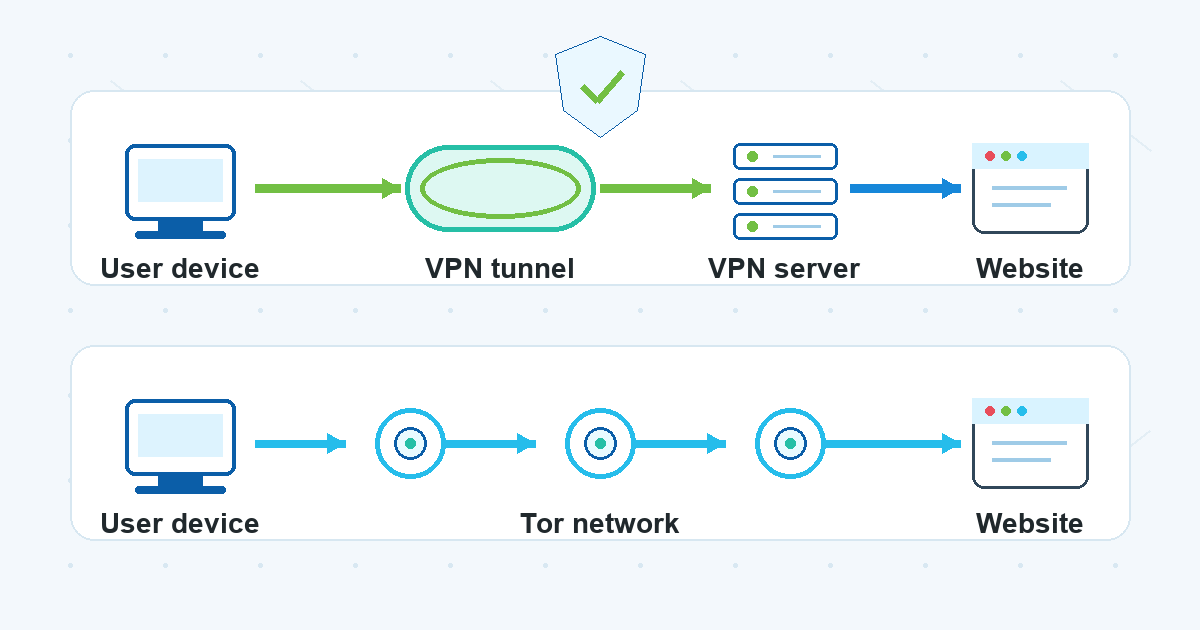
VPNs and Tor are often mentioned in the same conversations about online privacy, but they are not the same kind of tool. A VPN changes how your internet traffic reaches websites and services. Tor routes web traffic through a volunteer relay network designed to make the path harder to link back to one user.
That sounds similar at first. In practice, the choice is less about which one is “better” and more about what you need: easier privacy for everyday browsing, more separation between your browsing activity and your network identity, better speed, fewer website issues, or a more careful setup for sensitive research.
This vpn vs tor guide explains the choice in plain language, without treating either tool as magic.
The Short Version
A VPN is usually the more practical choice for routine internet use: public Wi-Fi, general browsing, streaming your own accounts, remote work, and reducing what a local network or internet provider can see about your browsing route.
Tor is built for stronger separation between your browsing destination and your network address, especially inside Tor Browser. That extra routing can make browsing slower, and some websites may add checks, block access, or behave differently.
Neither tool makes you completely anonymous. If you log in to a personal account, type identifying details into a form, reuse the same browser profile, download risky files, or ignore account and device security, a privacy tool cannot erase those signals.
What a VPN Does
A VPN creates an encrypted connection between your device and a VPN server. From there, your traffic continues to the website or online service you are using.
For a beginner, the main idea is simple:
- The Wi-Fi network or internet provider generally sees that you are connected to a VPN server, not the full list of sites inside that VPN tunnel.
- The website generally sees the VPN server’s network address rather than your home or coffee-shop network address.
- Your browsing experience often works much like normal internet use because websites are still reached through a single regular-looking connection path.
That does not mean a VPN removes every privacy risk. Websites can still recognize account logins, cookies, browser fingerprints, payment details, device behavior, and information you choose to share. A VPN also does not replace good passwords, multi-factor authentication, software updates, or careful judgment around suspicious links.
What Tor Does
Tor routes supported traffic through a chain of relays instead of sending it through one VPN server. Tor Browser is the most familiar way many people use this network for web browsing.
In a simplified version, your traffic passes through several relay points before reaching a destination. Each part of the route is designed so that no single relay has the full picture of both who you are and where you are going.
That design is why Tor is often discussed for anonymity-oriented browsing. It also explains some of the tradeoffs. Multiple relays can make pages load more slowly. Some websites treat Tor traffic as unusual and may show extra verification checks. Logging in to personal accounts can also reduce the privacy benefit because the account itself identifies you to that service.
The Difference Between VPN and Tor
The difference between vpn and tor comes down to routing, trust, speed, and everyday usability.
A VPN uses one encrypted tunnel to a VPN server. Tor uses multiple relays. A VPN is often easier to use across normal apps and browsing sessions. Tor is usually most relevant inside Tor Browser and for browsing contexts where separating your network identity from your destination matters more than speed or convenience.
Here is the practical comparison:
| Question | VPN | Tor |
|---|---|---|
| How does traffic route? | Through an encrypted tunnel to a VPN server, then onward to the destination. | Through multiple Tor relays before reaching the destination. |
| What is it best suited for? | Everyday privacy on public Wi-Fi, general browsing, and reducing local network visibility. | Browsing where stronger separation from your network address is a priority. |
| What about speed? | Often closer to normal browsing, though performance depends on many factors. | Often slower because traffic passes through multiple relays. |
| What about websites? | Usually works like a normal connection, though some sites may still add checks. | Some websites may challenge, limit, or block Tor traffic. |
| What if you log in? | The site can still know it is you through the account. | The site can still know it is you through the account. |
The important point in tor vs vpn comparisons is that this is not a single winner-takes-all decision. They solve overlapping but different privacy problems.
Tor Browser vs VPN: A Common Beginner Confusion
The phrase tor browser vs vpn can be confusing because it compares two different layers.
Tor Browser is a browser configured to use the Tor network and reduce some browser-level tracking signals. A VPN connection, by contrast, usually works at the device or network level, routing traffic through a VPN server for apps that use that connection.
That difference matters. If you open Tor Browser, your regular browser and other apps are not automatically using Tor. If you connect to a VPN, many apps may use the VPN connection, depending on your device and setup, but that does not give those apps Tor Browser’s specific browsing environment.
For everyday users, a useful way to think about it is:
- Use a VPN when you want a simple privacy layer for routine internet connections.
- Use Tor Browser when the browsing session itself needs stronger separation from your network address and you accept slower performance and possible site friction.
- Do not assume either one protects you from everything you do after the connection is made.
Tor vs VPN for Privacy: What Each One Helps With
When people search for tor vs vpn for privacy, they are often asking a practical question: what can my internet provider, Wi-Fi owner, websites, and accounts still see?
A VPN can help reduce exposure on local networks. For example, on public Wi-Fi, the network operator should not be able to read the contents of properly encrypted HTTPS pages, but without a VPN it may still see more connection metadata than many users expect. With a VPN, the local network mainly sees a connection to the VPN server.
Tor focuses on separating your browsing destination from your network address by routing traffic through multiple relays. That can be useful when the network address itself is sensitive. The tradeoff is that Tor traffic can be slower and may attract more website checks.
Both tools still leave important privacy limits:
- If you log in to an account, the service can associate the session with that account.
- If you accept tracking cookies or use the same browser profile everywhere, sites may connect activity across visits.
- If you share personal information in a form or message, a network privacy tool cannot make that information private.
- If your device is compromised, a VPN or Tor session is not a full device security fix.
Privacy is a system of habits, settings, accounts, and tools. A VPN or Tor can be part of that system, but neither one is the whole system.
When a VPN Makes More Sense
A VPN is often the practical fit when you want a privacy layer that does not change your browsing routine too much.
Common examples include:
- Using public Wi-Fi in hotels, airports, cafes, or coworking spaces.
- Reducing what a local network can observe about your browsing route.
- Keeping everyday apps and websites usable with less friction.
- Signing in to normal accounts where convenience and connection stability matter.
- Avoiding unnecessary exposure of your home or current network address to websites.
This is also the kind of everyday VPN context where VPN Unlimited by KeepSolid may be relevant for readers considering a normal browsing setup. The key is to treat a VPN as a practical connection privacy tool, not as a promise that every online action becomes anonymous.
When Tor Makes More Sense
Tor may be a better fit when the main goal is to make it harder to connect a browsing destination with your network address, and you are willing to accept a slower, more restricted browsing experience.
It can be useful for research-heavy browsing, reading sensitive topics, or reducing the link between a browsing session and a network location. The safer framing is not “Tor makes you invisible.” It is that Tor changes the routing model in a way that can reduce certain linkability risks.
Tor is usually less convenient for routine account-based browsing. If you sign in to your personal email, shopping account, banking account, or social profile, the account provider may know who you are regardless of the network path. Some services may also challenge the session because Tor traffic looks different from a typical residential or mobile connection.
Should You Use Both Together?
Some users consider combining Tor and a VPN. This can be useful in specific privacy models, but it is not automatically stronger for everyone. It can add complexity, slow down browsing, and create a false sense of protection if the rest of the setup is careless.
For most beginners, it is better to start with the question:
- What am I trying to hide from the local network?
- What am I trying to hide from the website?
- Am I logging in to an account that identifies me anyway?
- Do I need normal speed and compatibility?
- Do I understand what the tool does not protect?
If the answers are mostly about everyday Wi-Fi and routine browsing, a VPN is usually simpler. If the answers are about separating a browsing session from a network address, Tor Browser may be more relevant.
A Practical Decision Guide
Choose a VPN when:
- You want simple protection for everyday browsing on shared or public networks.
- You need normal website compatibility.
- You are using regular accounts and apps.
- You care about reducing local network visibility more than changing your whole browsing pattern.
Choose Tor Browser when:
- You need stronger separation between your browsing destination and your network address.
- You can accept slower page loads.
- You can handle website verification checks or access limits.
- You are not relying on personal account logins during that browsing session.
Be cautious with both when:
- You are dealing with legal, workplace, school, or service-policy questions.
- You are handling highly sensitive personal, professional, or security matters.
- You need a guarantee. Privacy tools can reduce certain risks, but they cannot remove every risk.
FAQ
Is Tor a VPN?
No. Tor is not a VPN. A VPN routes traffic through an encrypted tunnel to a VPN server. Tor routes supported traffic through multiple relays, commonly through Tor Browser for web browsing.
Is a VPN faster than Tor?
Often, yes, but speed depends on many factors. Tor commonly feels slower because traffic passes through multiple relays. A VPN connection is usually closer to normal browsing because it uses a simpler route.
Does Tor make me anonymous?
Tor can reduce some ways a browsing session is linked to your network address, but it does not guarantee anonymity. Account logins, browser behavior, downloads, device security, and personal information you share can still identify you.
Does a VPN make me anonymous?
A VPN can hide some connection details from a local network and change the network address websites see, but it does not make you anonymous by itself. Websites can still identify logged-in accounts, cookies, device signals, and information you provide.
Which is better for public Wi-Fi?
For routine public Wi-Fi use, a VPN is usually the more convenient choice because it protects the connection path while keeping normal apps and websites usable. Tor may be more relevant for a specific browsing session where network-address separation matters more than speed.
Bottom Line
The simplest way to compare VPN and Tor is this: a VPN is usually for practical everyday connection privacy, while Tor is for browsing sessions where stronger separation from your network address matters enough to accept slower speed and more website friction.
The right choice depends on the privacy problem in front of you. If you want a straightforward tool for routine browsing and public Wi-Fi, a VPN is often the more usable starting point. If you need a browser session designed around relay-based anonymity, Tor Browser is a different tool for that different job.
Either way, keep the limits in mind. Privacy improves when the tool, the account choices, the browser habits, and the device security all work together.