
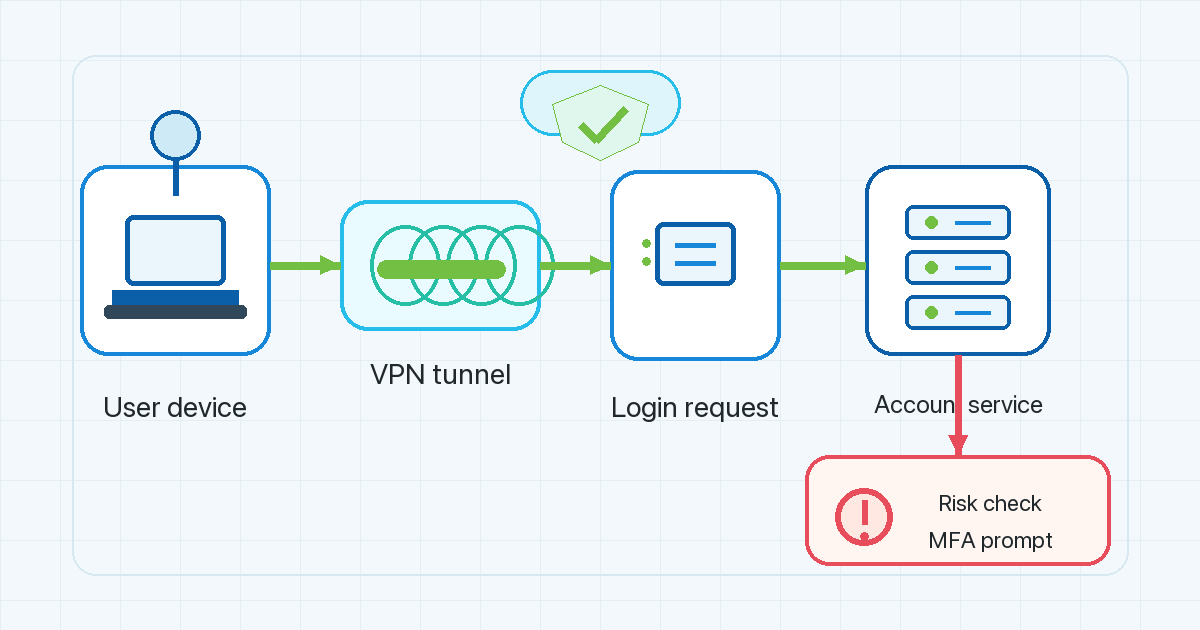
Travel can make an ordinary login look less ordinary.
You may use the same phone, the same password manager, and the same banking app, yet still see an extra verification step after landing in another country. Sometimes the message is mild: confirm this was you. Sometimes it feels more serious: suspicious login attempt, account temporarily restricted, or access blocked until you verify your identity.
That does not mean the bank or platform knows your whole travel story. It usually means one or more signals changed. Location is one of them. Device, network route, login time, session behavior, and previous account history may matter too.
This article explains why a login from different country can trigger account friction, what impossible travel detection means, and how to prepare for online banking while traveling without treating fraud controls as something to defeat.
Why location changes matter to account-risk systems
Banks, email providers, SaaS tools, marketplaces, and other sensitive services try to protect accounts from takeover. If an attacker gets a password, the service needs other ways to notice that the login does not match the account’s normal pattern.
The Microsoft Entra risk-based access documentation is an enterprise identity example, but the basic logic is useful: when a sign-in looks risky, a system may require extra controls such as MFA, reauthentication, password change, or blocking the attempt. The exact rules vary by provider, and consumer banks will not all work like an enterprise identity platform. Still, the principle is familiar: higher perceived risk can create more verification.
Location change can be one risk signal because it may suggest that the account is being used from an unfamiliar place. But location alone should not be treated as the whole story. A normal traveler, a mobile network, a VPN route, or a work connection can all change the apparent source of a login.
That is why a careful way to think about account-risk scoring is not “new country equals bad login.” It is more like this:
- Is the device familiar?
- Is the login time plausible?
- Is the account behavior normal after login?
- Did the network or location change suddenly?
- Is MFA completed through a trusted method?
- Does the session match past account history?
A service may challenge the login when enough signals look unfamiliar together.
What “impossible travel detection” means
Impossible travel detection is a specific kind of location-based check. It compares login times and estimated locations. If one login appears in one country and another appears somewhere far away a few minutes later, the system may decide that the same person could not realistically have traveled between those places.
The Fingerprint article on impossible travel detection explains this concept in the context of stopping suspicious logins. Its most useful point for travelers is also its caveat: apparent location can be noisy. VPNs, proxies, mobile networks, and IP-location databases can make a session appear to jump, even when the user has not done anything malicious.
That does not mean detection is pointless. It means location is best understood as one input, not final proof. A rapid sequence of country changes may look unusual, especially if it happens near a sensitive login, but a responsible service should consider other signals too.
For travelers, the practical lesson is simple: avoid creating avoidable location noise right before important account activity. If you do not need to switch between several countries or routes before logging in to a bank, payment account, email account, or work dashboard, keep the session path as steady as you reasonably can.
Why banks can lock or challenge accounts while you travel
If you have ever had a bank account locked while traveling, the lock probably felt like the problem. From the bank’s side, it may have looked like a protective pause.
The Feedzai article on account takeover fraud describes how fraud-prevention systems look for signs that someone other than the account owner may be trying to get in. The article is from a vendor, so it should not be read as independent research or as a universal description of every bank. But the general idea is relevant: unusual device, location, transaction, or behavior signals can raise concern.
A travel login can create several changes at once:
- You are using a hotel, airport, coworking, or mobile network instead of your usual home network.
- Your apparent country or region has changed.
- Your login time may be unusual compared with your normal pattern.
- Your device may have changed networks several times in a short period.
- You may be trying to complete a high-risk action, such as adding a payee or changing account details.
None of these automatically proves fraud. Together, they can explain why a service may show a suspicious login attempt warning or ask for more verification.
Where a VPN fits, and where it does not
A VPN can be useful when you are on public Wi-Fi or another network you do not fully trust. VPN Unlimited by KeepSolid can be mentioned in that context as a privacy and network-routing tool for VPN Satelites readers. But a VPN should not be framed as a way to make banking risk checks disappear.
When you connect through a VPN, the service you log in to may see the VPN server’s network route rather than the local network route you would otherwise use. That can be helpful for privacy on the network side, but it can also change the signals a bank or platform sees.
The safe takeaway is:
- A VPN can help protect your connection on untrusted networks.
- A VPN does not erase your account identity, device history, cookies, MFA requirements, or provider-side risk checks.
- A VPN does not guarantee that a bank, marketplace, email service, or work platform will accept a login.
- A VPN should not be used to bypass fraud controls, service rules, or local law.
The best travel setup is not “hide everything.” It is “reduce unnecessary surprises while keeping your connection and account recovery options ready.”
How to reduce avoidable login friction before a trip
You cannot control every account-risk rule, and you should not try to evade them. You can reduce avoidable friction by preparing before you travel.
Check your recovery methods
Make sure your account recovery email, phone number, authenticator app, and backup codes are current before departure. If your bank sends SMS codes, confirm that your mobile plan will receive them abroad or that another approved verification method is available.
Do not wait until you are already locked out to discover that your recovery number is old.
Keep MFA ready
Step-up verification is normal when risk looks higher. Treat MFA as part of the login process, not as an error. Authenticator apps and hardware security keys can be easier to use while traveling than methods tied to one mobile carrier, depending on the account’s supported options.
Use the methods your bank or platform officially supports.
Avoid unnecessary rapid location switching
If you are about to sign in to a sensitive account, avoid rapidly changing VPN servers, mobile networks, and Wi-Fi networks unless you have a practical reason. A stable route cannot guarantee access, but it may reduce confusing signal changes around the login.
This is especially relevant when moving between airports, hotels, and coworking spaces in the same day.
Use familiar devices when possible
Logging in from your own secured phone or laptop is usually less surprising than logging in from a shared device. Keep the operating system, browser, banking app, and password manager updated before travel.
Avoid public computers for sensitive accounts.
Contact the provider if you are blocked
If an account is locked, follow the provider’s official recovery flow. For banking, use the phone number or support channel listed in the bank’s app or official website, not a link from a random search result or message.
Do not look for shortcuts around the lock. The lock may be protecting your money, identity, or account history.
A practical travel login checklist
Before leaving:
- Update recovery email, phone, and MFA methods.
- Save backup codes where the account provider recommends.
- Update your device and security apps.
- Confirm how your bank handles travel notices, if it offers them.
- Test your VPN and account access from a trusted network before the trip.
During travel:
- Use trusted devices for sensitive accounts.
- Be cautious on airport, hotel, and cafe Wi-Fi.
- Keep your network route steady before important logins when possible.
- Expect extra verification after a country or network change.
- Stop and verify the source if a warning message looks suspicious.
If blocked:
- Use the provider’s official recovery flow.
- Contact support through the app or official website.
- Avoid repeated rapid login attempts from changing networks.
- Do not assume a VPN can fix the lock.
FAQ
Why did my bank flag my login while I was traveling?
Your bank may have seen a new location, unfamiliar network route, unusual timing, device change, or other behavior that did not match your normal pattern. The exact rule is provider-specific. Extra verification does not automatically mean you did anything wrong.
Can a VPN prevent a suspicious login attempt warning?
No VPN can guarantee that. A VPN changes the network route a service may see, but account systems can also consider device, cookies, MFA, account behavior, timing, and other signals. Use a VPN for appropriate privacy and network-protection reasons, not to bypass account checks.
What is impossible travel detection in simple terms?
It is a check that looks for logins from locations that seem too far apart for one person to travel between in the time available. It can help detect account takeover attempts, but apparent location can also be affected by VPNs, proxies, mobile networks, and IP-location data.
Is online banking while traveling safe?
It can be done responsibly, but you should prepare. Use your own secured device, keep MFA and recovery methods ready, avoid public computers, be careful on shared Wi-Fi, and follow your bank’s official guidance. This article is practical security information, not banking or legal advice.
What should I do if my bank account is locked while traveling?
Use the bank’s official recovery process and contact the bank through its verified app, website, or card support number. Do not try to bypass the lock. It may be an account-protection measure.
The main point
Travel changes context. A new country, a new network, a VPN route, a different time zone, and a sensitive account action can all make a normal login look unusual.
The goal is not to make risk checks disappear. The goal is to understand why they happen, reduce avoidable signal changes, keep MFA and recovery options ready, and use privacy tools like a VPN in a way that supports safe, legitimate account access.