
If you freelance from a cafe in the morning, a coworking space after lunch, and a hotel lobby between meetings, your work session moves through networks you do not control. That matters when you are opening client dashboards, project tools, invoices, shared docs, admin panels, and work email.
The practical question is not whether every public network is dangerous. The better question is simpler: when you are doing client work, are you keeping that browsing session separated from the local Wi-Fi environment as much as you reasonably can?
A VPN can help with that separation. It is not the whole security plan, and it does not make careless work habits safe. But for freelancers, a public wifi security vpn setup can be a useful layer when the network belongs to a cafe, hotel, airport, venue, client office, shared apartment, or mobile hotspot.
Why Freelancers Should Think Differently About Shared Wi-Fi
Freelancers have a messy network life. A full-time employee may spend most workdays behind the same office controls. A freelancer often switches between whatever connection is available: a rented desk, a client’s guest network, a train station hotspot, a friend’s apartment, or a phone tether during a deadline.
That creates two problems.
First, you may not know who manages the network, what equipment is used, how guests are isolated, or whether the Wi-Fi name is the one you intended to join. Second, your work often spans multiple clients. One laptop may hold sessions for design portals, CMS accounts, analytics dashboards, developer tools, payment tools, and private client communication.
Separating client-work traffic from the local network context is a basic hygiene move. It reduces how much the network around you can participate in your browsing route, and it gives you a more consistent way to start sensitive work sessions when your physical location changes.
What Are the Main Public Wi-Fi Risks for Client Work?
Public and shared Wi-Fi can be convenient without being trustworthy. The risk is not always a dramatic attack. Often, the concern is a stack of smaller uncertainties:
For freelancers, public wifi security risks usually come down to working on a network you cannot inspect or manage while your client accounts are open.
- You cannot easily inspect the router, access point, or guest isolation settings.
- A network name may look familiar but still be the wrong hotspot.
- Other people may be connected to the same local network.
- Captive portals can interrupt your normal connection flow before you start work.
- Some older or misconfigured websites and apps may not protect every request the way you expect.
- Local network devices may expose names, discovery services, or other signals you did not mean to share.
HTTPS already protects the content of most modern website sessions between your browser and the website. That is good, and it matters. A VPN does something different: it creates an encrypted tunnel from your device to a VPN server, so the local network is no longer the direct path for your browsing traffic in the same way.
That distinction is important. A VPN does not replace secure websites, strong passwords, two-factor authentication, software updates, or client access rules. It can, however, reduce exposure to the local network while you work.
What “Separated” Means in Plain English
For a freelancer, separation does not mean disappearing from the internet. It means adding boundaries between the work session and the network you happen to be using.
Think of three layers:
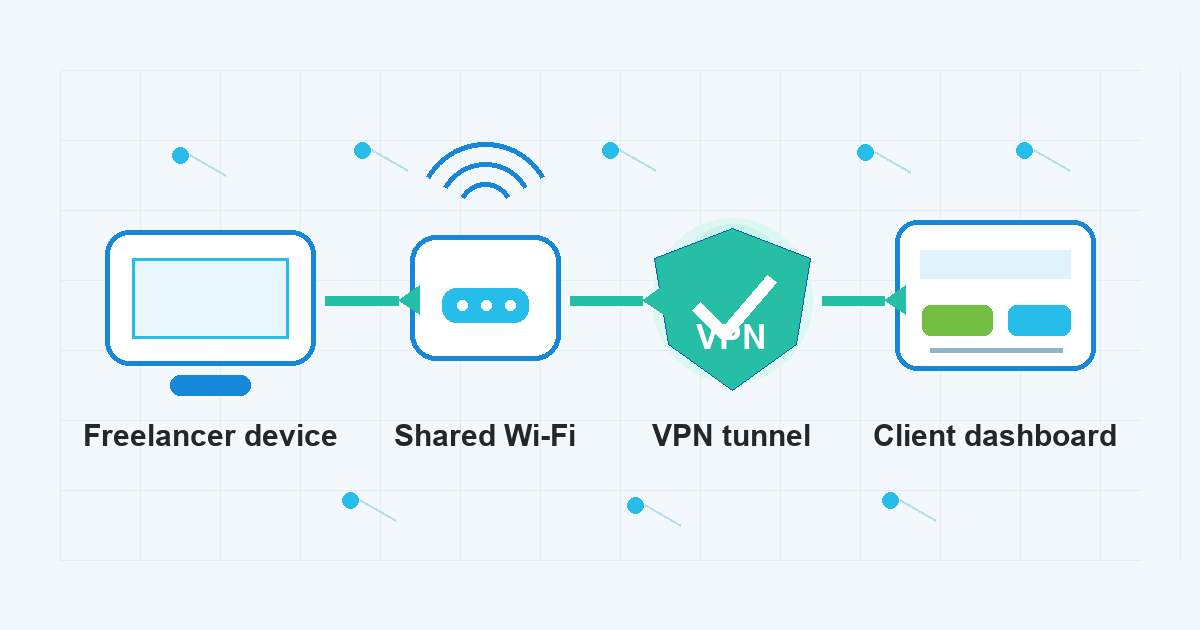
- Your device: the laptop or phone where your client accounts are open.
- The local network: the Wi-Fi or hotspot carrying your connection.
- The services you use: client dashboards, websites, email, payment tools, and project platforms.
Without a VPN, your device connects through the local network on its way to those services. With a VPN connected, your device sends traffic through an encrypted tunnel to the VPN server first, then onward to the destination. The local network still provides connectivity, but it gets less direct visibility into your browsing route.
That is the core benefit for freelance work on shared Wi-Fi: not magic protection, but cleaner routing boundaries.
How to Work More Safely on Public Wi-Fi
Before you open client accounts on a shared network, slow down for a minute and build a repeatable routine. The goal is to reduce obvious mistakes, not to turn every cafe table into a managed office.
If you are wondering how to use public wifi securely during a work session, start with the basics below and treat the VPN connection as one part of the routine.
- Confirm the network name before joining. If you are in a cafe, hotel, coworking space, or client office, check the exact Wi-Fi name with staff or posted instructions instead of guessing from a list of lookalike names.
- Avoid sensitive work until the captive portal is finished. Some networks require a browser login or terms page before normal internet access works. Complete that step first, then connect your VPN before opening client dashboards or work accounts.
- Start the VPN before the client session. Make the VPN connection part of your work setup, the same way you might open a password manager or close unrelated tabs.
- Use HTTPS and watch browser warnings. A VPN is not a reason to ignore certificate alerts, strange redirects, or unexpected login pages.
- Keep client work in a dedicated browser profile when practical. Separate profiles can reduce accidental cross-client logins, mixed cookies, and personal browsing overlap.
- Use two-factor authentication for client accounts that support it. A VPN helps with network routing, while 2FA helps protect the account if a password is exposed or reused elsewhere.
- Disconnect from Wi-Fi when the session is done. If you are finished with client work, close sensitive tabs, log out where appropriate, and leave networks you no longer need.
This is the practical meaning of secure browsing on public wifi: use the VPN layer, but pair it with account hygiene, browser caution, and a work routine you can actually follow.
Where a VPN Fits in a Freelancer’s Work Routine
A VPN is most useful when you start it before the sensitive part of the session. For example:
- Before logging into a client CMS from a hotel network.
- Before opening invoices, contracts, or payment tools in a coworking space.
- Before checking work email on an airport or conference Wi-Fi network.
- Before using a client’s guest network when you do not know its configuration.
- Before moving from a mobile hotspot back to public Wi-Fi during a deadline.
If you use VPN Unlimited by KeepSolid on your Mac, keep the product framing simple: connect before the work session where a VPN is appropriate, then continue to use normal account security practices. The VPN is there to add a more private route through the network, not to approve risky behavior or override client policies.
What a VPN Does Not Fix
The question is vpn enough for public wifi comes up often because people want one switch that settles everything. The honest answer is no. A VPN can be useful, but it does not solve every public Wi-Fi problem.
A VPN does not:
- make weak passwords strong;
- stop phishing pages from tricking you;
- prove that a website or client portal is legitimate;
- protect a device that is already compromised;
- replace operating system and browser updates;
- override your client contracts, security policies, or legal responsibilities;
- guarantee access to every site or service;
- guarantee anonymity or make account activity unlinkable to you.
That limitation does not make a VPN pointless. It just puts the tool in the right place. Use it for network-layer separation and routing privacy. Use password managers, 2FA, updates, device locks, and careful account handling for the rest.
A Simple Freelancer Checklist Before Opening Client Dashboards
Use this short checklist when you are about to work from a shared connection:
- Am I on the correct Wi-Fi network?
- Have I finished the captive portal before logging into client tools?
- Is my VPN connected before I open work accounts?
- Am I using HTTPS without browser warnings?
- Is this the right browser profile or workspace for this client?
- Are password manager and 2FA available if I need to log in?
- Have I closed personal tabs or unrelated client sessions?
- Do I need to use a mobile hotspot instead of this network for this task?
The last question is important. Sometimes the better decision is not “VPN or no VPN.” It is “Should I do this task here at all?” If you are handling unusually sensitive client access, a quieter and better-controlled connection may be the safer choice.
FAQ
Should freelancers use a VPN every time they work on public Wi-Fi?
For client work on shared or public networks, using a VPN is a sensible default when it does not conflict with client policy or tool requirements. It helps separate your browsing route from the local network. It should still be paired with HTTPS, strong passwords, 2FA, updates, and careful login habits.
Does a VPN protect everything I do in a client dashboard?
No. A VPN helps protect the network path between your device and the VPN server, but it does not control what happens inside the client dashboard, whether the dashboard is configured safely, or whether your account credentials are strong. Treat it as one layer.
Can I ignore HTTPS warnings if my VPN is connected?
No. Browser security warnings still matter. If a login page shows a certificate warning, unexpected redirect, or strange domain, stop and verify the site before entering credentials.
Is a mobile hotspot safer than public Wi-Fi?
A mobile hotspot can reduce some public Wi-Fi uncertainty because you are not joining the venue’s shared network. It is still not a complete security plan. You should still use account protections, software updates, and a VPN when appropriate for your work session.
What is the safest habit for freelancers who switch networks often?
Build a repeatable start-work routine: verify the network, finish any captive portal, connect the VPN, open only the client accounts you need, check for HTTPS warnings, and close the session when you are done. Consistency matters because network switching is where rushed mistakes happen.
Bottom Line
Freelancers do not always get to choose a perfect network. You may need to send a proposal from a cafe, approve a client change from a hotel, or check a dashboard from a coworking space. The goal is to make those sessions less exposed to the local network around you.
A VPN is a practical part of that routine. It helps separate client-work browsing from the Wi-Fi you are using today. It is not enough on its own, but used with HTTPS, 2FA, strong passwords, browser discipline, and good judgment, it gives freelancers a cleaner way to work across changing networks.