
Education work does not always happen from a school office. Administrators approve forms from home, operations staff check dashboards while traveling, and remote support teams may handle routine work from a shared workspace, hotel, or conference Wi-Fi.
That flexibility is useful, but it also changes the access environment. The network is no longer the one your school IT team manages every day. The device may be on a home router, a public hotspot, or a shared network with people you do not know. For education administrators and remote staff, better off-campus habits start with a simple question: what should be protected before school work begins?
VPN Satelites can fit into that routine as a VPN layer for safer network routing. It should be used alongside your organization’s policies, approved accounts, MFA, updated devices, and standard security tools, not instead of them.
Why Off-Campus School Work Needs A Clear Access Routine
Most education staff are not trying to do anything unusual when they work off campus. They may be checking email, reviewing schedules, updating internal systems, joining meetings, or opening cloud tools used by the school. The risk comes from the environment around that work.
Off-campus access often includes:
- home Wi-Fi that may be shared with family devices;
- hotel, airport, library, cafe, or conference networks;
- temporary travel connections;
- coworking or shared office Wi-Fi;
- mobile hotspots used as a backup connection.
Each network has its own configuration, owner, and traffic conditions. A school-managed office network may have filtering, monitoring, segmentation, and support. A public hotspot may only offer basic connectivity. That gap is why remote access security should be treated as a repeatable routine instead of a one-time setup.
The goal is not to make broad promises about perfect protection. The goal is to reduce avoidable exposure, keep staff behavior consistent, and make it easier for administrators to follow policy even when they are away from campus.
Where A VPN Fits In Remote Access Security
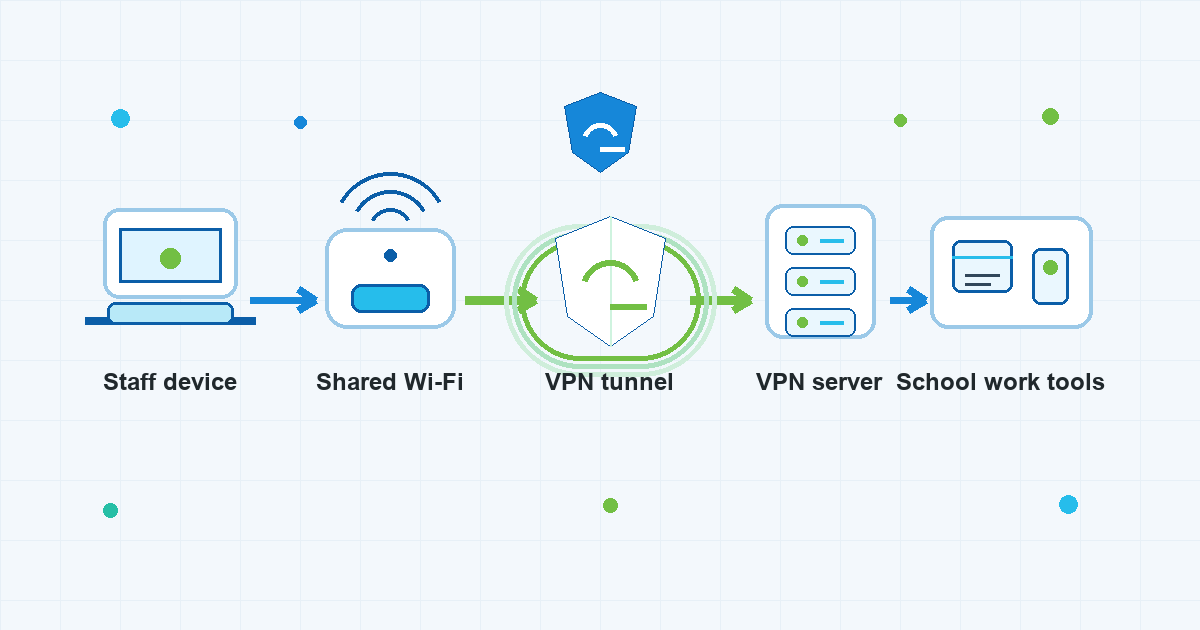
A VPN changes how network traffic is routed between a device and the internet. When connected, the device sends traffic through a VPN tunnel to a VPN server before it reaches websites and online services. For off-campus staff, this can be useful when the local network is shared, unfamiliar, or not controlled by the school.
That does not mean a VPN solves every security problem. It does not decide whether a user is allowed to access a school system. It does not replace account permissions, MFA, device updates, endpoint protection, browser security, or careful handling of sensitive records. It also does not make a logged-in user anonymous to the services they access.
For education administrators, the right mental model is practical: a VPN is one layer in the access path. It helps with the network-routing part of the routine while other controls handle identity, device health, application permissions, and policy.
What “Secure Remote Access For Schools” Should Mean In Practice
The phrase secure remote access for schools can sound like a large enterprise project. Sometimes it is. But for day-to-day staff behavior, it also comes down to clear habits that people can repeat without needing to be network engineers.
Before doing school work off campus, staff should know:
- which devices are approved for work;
- which accounts and MFA methods must be used;
- which school systems may be accessed remotely;
- whether VPN use is required, recommended, or restricted by policy;
- what to do if a device is lost, a login looks suspicious, or access fails;
- which kinds of work should wait until the staff member is back on a trusted connection.
VPN Satelites belongs in that conversation as the VPN part of the access routine. If the school or organization allows VPN use, staff can connect before opening routine work tools on shared or unfamiliar networks. The policy still matters: a VPN should support the organization’s rules, not become a way around them.
Common Off-Campus Situations For Education Staff
Different staff roles meet different network problems. A finance administrator may log in from a hotel during a district event. A remote support worker may help colleagues from home. An operations manager may check scheduling tools between meetings at a conference. The technical setting changes, but the habit can stay consistent.
Working From Home
Home networks are familiar, but they are not automatically managed like a school office network. Routers may be old, passwords may be shared, and multiple personal devices may use the same connection.
A safer home routine includes keeping the router and work device updated, using the approved school account, turning on MFA where required, and connecting to the VPN when policy calls for it. The VPN does not fix every home network issue, but it can help separate the staff member’s work traffic from the local network path.
Using Hotel Or Conference Wi-Fi
Travel connections are convenient and unpredictable. Staff may have to use a captive portal before getting online, and the network may be shared by many guests or attendees.
In this setting, public wifi security matters because the staff member has little control over the network. A practical routine is to connect only to the intended network, avoid entering sensitive information into suspicious pages, confirm the VPN is connected after the captive portal step, and then open school work tools.
Working From Cafes, Libraries, Or Shared Spaces
Shared spaces create a similar problem: the connection may be stable enough for work, but it is still outside the organization’s normal environment. Staff should avoid treating it like a school office network.
For routine work, the better habit is to connect through the approved VPN, use MFA, keep sessions locked when stepping away, and avoid downloading or storing sensitive files unless that is allowed by policy.
A Simple Off-Campus Access Checklist
Education administrators do not need a complicated checklist for every login. They need a short routine that is easy to remember and easy to explain to remote staff.
Before opening school work tools off campus:
- Confirm the device is appropriate for the work.
- Use the approved school account, not a personal workaround.
- Check that the operating system, browser, and security tools are up to date.
- Connect only to a network you intended to use.
- Start the VPN if policy allows or requires it.
- Confirm MFA prompts look expected before approving them.
- Avoid handling sensitive records on shared or distracting networks unless policy permits it.
- Lock the screen when stepping away.
- Sign out of work tools when finished, especially on shared or temporary connections.
This is where a vpn for remote workers message can be useful for education teams. The staff member does not need to understand every routing detail. They need to know when to connect, what else must stay in place, and who to contact if something feels wrong.
How To Talk About A VPN For Schools Without Overpromising
The phrase vpn for schools can attract several different kinds of search intent. Some people may be looking for student bypass advice, provider comparisons, or ways around network restrictions. That is not the right framing for education administrators and remote staff.
For staff use, a VPN should be discussed in policy-aware terms:
- Use it for safer routing on shared or unfamiliar networks.
- Use it as part of an approved remote-work routine.
- Keep identity checks, MFA, device controls, and school IT guidance in place.
- Do not use it to evade school or workplace restrictions.
- Do not describe it as a guarantee of privacy, compliance, anonymity, or protection from breaches.
This framing is more honest and more useful. It helps staff understand the VPN’s role without turning it into a magic switch.
What A VPN Does Not Replace
A careful access plan is strongest when each tool has a clear job. A VPN helps with the network path, but many off-campus risks happen outside that path.
A VPN does not replace:
- MFA for school accounts;
- strong passwords and password managers;
- device encryption and screen locks;
- endpoint protection;
- secure browser habits;
- phishing awareness;
- role-based access permissions;
- school IT approval and acceptable-use rules;
- compliance, privacy, or legal review.
That distinction matters for administrators. If staff believe a VPN alone makes every remote session safe, they may ignore the controls that actually decide who can access what, from which device, and under which policy.
Using VPN Satelites As Part Of The Routine
VPN Satelites can be positioned as the VPN step in a broader off-campus workflow. The workflow should be simple enough for staff to follow before they open school work tools:
- connect to the intended network;
- complete any required captive portal step;
- connect the VPN;
- verify the expected work account and MFA flow;
- open approved school tools;
- disconnect and sign out when the work session ends.
For administrators, the useful outcome is consistency. Staff do not have to make a new judgment call every time they sit down in a hotel lobby, home office, or shared workspace. They have a repeatable path that includes VPN use where appropriate and keeps the rest of the organization’s access controls in place.
FAQ
Should education staff use a VPN every time they work remotely?
Follow the organization’s policy first. If VPN use is approved or required for off-campus work, staff should connect before opening routine school work tools on home, shared, travel, or public networks. If a policy says certain systems must only be accessed another way, that policy should control the workflow.
Does a VPN make school work fully secure?
No. A VPN can help with the network-routing part of a remote session, especially on shared or unfamiliar networks. It does not replace MFA, device security, endpoint protection, account permissions, staff training, school IT controls, or compliance review.
Is public Wi-Fi always unsafe for school work?
Public Wi-Fi varies, and staff usually cannot inspect how it is managed. The safer approach is to treat public and shared networks as higher caution environments: connect only to the intended network, use approved accounts and MFA, start the VPN where policy allows, avoid suspicious prompts, and limit sensitive work to approved conditions.
Can a VPN help remote staff who travel?
Yes, as one part of a broader routine. A VPN can give traveling staff a more consistent network-routing step when they move between hotels, airports, conferences, home networks, and mobile hotspots. It should still be paired with approved devices, MFA, updates, and school policy.
Should a school describe this as a VPN for students?
Not for this use case. This article is about administrators, operations staff, and remote education support workers doing authorized work off campus. It should not be framed around bypassing school restrictions or avoiding supervision.
The Practical Takeaway
Education administrators and remote staff need off-campus access habits that are clear, repeatable, and honest about what each tool does. VPN Satelites can support that routine as the VPN layer for shared, travel, home, and public networks. It is most useful when staff also follow the basics: approved devices, approved accounts, MFA, updates, careful session handling, and school IT policy.
That is the right balance for safer remote work in education. Use the VPN for the network path. Keep the rest of the access plan in place.