
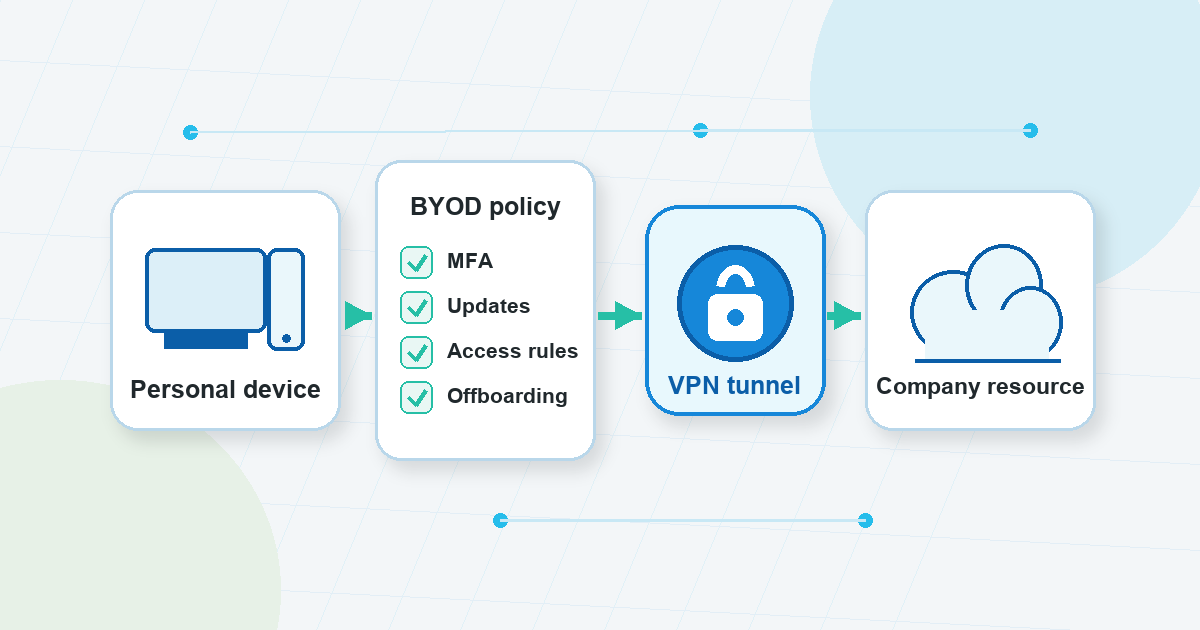
Small teams often adopt BYOD for a simple reason: work needs to happen before a formal device program exists. A contractor uses a personal laptop to upload files. A manager approves a dashboard from home. A founder checks an admin panel from a phone while traveling.
That flexibility can be useful. It also changes the security question.
With company-owned devices, a team can usually define the hardware, settings, updates, support process, and offboarding routine more directly. With BYOD, personally owned devices bring more variation. One laptop may be patched and used only by one person. Another may be older, shared at home, full of personal apps, or used across several client projects.
A VPN can help with one important part of that picture: the network path. It can support safer remote access habits when people connect from home networks, hotels, coworking spaces, airports, or other networks the company does not manage. But it cannot decide which personal devices are acceptable, enforce every account rule, separate work and personal files, or remove access after someone leaves.
That is the practical answer for BYOD teams: use a VPN where it fits, but build the rest of the remote access security routine around it.
BYOD Is Not Just a Connectivity Decision
BYOD means “bring your own device.” In practice, it means employees, contractors, or partners use personal laptops, phones, or tablets for some work tasks.
The NCSC’s BYOD guidance frames this as a balance between usability, risk, management depth, and corporate-data ownership. That framing is useful because it keeps the conversation out of the “just connect to the VPN” trap.
Before a personal device reaches a work account, the team should know:
- Who is allowed to use a personal device for work.
- Which work systems are allowed from personal devices.
- What device condition is acceptable before access.
- How work data may be stored or synced.
- Who supports the device when something breaks.
- What happens when a device is lost, sold, repaired, or shared.
- How access is removed during offboarding.
If those answers are unclear, the team does not really have a byod policy. It has habits, exceptions, and assumptions. A VPN can make one route safer, but it cannot turn unclear ownership into clear rules.
Where a VPN Helps BYOD Teams
A VPN is easiest to understand as a network-path tool. Depending on the setup and product in use, it can help route traffic through an encrypted VPN tunnel instead of leaving users to rely only on the local network they happen to be using.
That matters for BYOD because personal devices often connect from networks outside company control. A team may not know whether a hotel Wi-Fi network is configured well, whether a coworking network is crowded with unknown devices, or whether a home router is maintained properly.
In that setting, a vpn for remote work can be a useful part of the routine:
- It gives users a defined way to connect when they are away from trusted networks.
- It can reduce exposure to some local-network risks on public or shared Wi-Fi.
- It can make remote-access expectations easier to document for non-technical users.
- It can sit beside account controls such as MFA and permission limits.
VPN Unlimited by KeepSolid may fit into that kind of remote-work routine as a VPN option, provided the team documents what the VPN is responsible for and what must be handled by policy, access control, and device hygiene.
The key is expectation-setting. A VPN can support a safer connection path. It is not the same thing as managing the personal device.
What a VPN Does Not Solve
The approved BYOD and remote-access sources point in the same general direction: BYOD risk is broader than the connection itself.
A VPN does not automatically answer questions like:
- Is the personal laptop updated?
- Is the phone shared with someone else?
- Does the user have MFA enabled?
- Are work files being saved into personal storage?
- Does the user still need access to this system?
- Has a contractor’s access been removed after the project?
- Are users trained to report suspicious login prompts or lost devices?
NIST’s remote-access and BYOD guidance is older, but still useful as foundational context here: external networks and personally owned devices need layered controls. That includes policy, secured client devices, authentication, access tiers, encryption, patching, and endpoint considerations. A VPN belongs in that layered model rather than replacing it.
For small teams, this distinction prevents two common mistakes. The first is treating VPN access as permission for any personal device to reach any work tool. The second is treating a written policy as enough while nobody checks access, updates, or offboarding.
Good byod security sits between those extremes. It is practical, written down, and owned by someone.
What Your BYOD Policy Should Decide
Deel’s BYOD policy article is useful for a practical reason: it lays out the types of decisions a remote team should define before personal devices become normal. The details will vary by company, but the categories are a solid planning checklist.
Device eligibility
Start by deciding which devices may be used. A personal laptop used by one employee is not the same risk as a shared family tablet or an old phone that no longer receives updates.
Your policy can keep this simple:
- Allowed device types.
- Minimum operating system or update expectations.
- Whether shared devices are allowed.
- Whether rooted, jailbroken, or otherwise modified devices are prohibited.
- What users must do if a device is lost or replaced.
Avoid writing a policy that only works for a perfect IT environment if your team is not there yet. Clear and realistic is better than strict and ignored.
Access control
Not every BYOD user needs the same access. A contractor who edits a document should not automatically receive the same permissions as someone managing billing, infrastructure, or customer records.
Useful rules include:
- Give people access only to the systems required for their role.
- Require MFA for important accounts.
- Avoid shared accounts where individual accountability matters.
- Review permissions on a regular schedule.
- Remove access promptly when someone leaves a role or project.
This is where remote access security becomes broader than VPN use. The VPN may help with the route, but accounts and permissions still need their own controls.
Data handling
Personal devices blur boundaries. A file downloaded for a quick task can remain in a personal folder. A phone may sync files to a personal cloud account. A laptop used for multiple clients may mix workspaces.
A BYOD policy should define what work data may be downloaded, where it may be stored, whether local copies are allowed, and how data should be handled when work ends.
For regulated, contract-restricted, or sensitive work, general blog guidance is not enough. The team should align BYOD rules with its own legal, HR, IT, client, and compliance requirements before allowing personal-device access.
Monitoring and privacy boundaries
BYOD is different from company-owned equipment because the device also belongs to the person. Deel’s article calls out monitoring and privacy boundaries as part of policy design. That is a useful reminder for small teams: do not leave people guessing about what the company can see, support, request, or require on a personal device.
The policy should explain what is expected without overreaching into private use. If the team needs deeper control than a personal-device arrangement can reasonably support, that may be a sign that the work belongs on company-managed equipment instead.
Support and offboarding
BYOD support can become messy if nobody defines the boundary. Will the company help troubleshoot a personal laptop? What happens if a VPN connection fails before a deadline? Who confirms that access is removed when a contractor leaves?
Write those answers before there is an urgent incident. Offboarding deserves special attention because small teams often rely on informal relationships. Access should end because the work ended, not because someone remembered weeks later.
BYOD Security Best Practices That Pair Well With VPN Use
Keeper’s BYOD best-practices article reinforces a practical point: VPN or remote-access rules belong beside other controls. For an IT-light team, the useful version is a short list of everyday habits that people can actually follow.
These byod security best practices are a good starting point:
- Write a plain-language BYOD policy before personal-device access becomes routine.
- Require MFA for important work accounts.
- Keep access narrow and role-based.
- Ask users to keep operating systems, browsers, and core apps updated.
- Define what work data may be downloaded or stored locally.
- Separate work and personal data where possible.
- Avoid shared personal devices for sensitive work.
- Train users on public Wi-Fi, lost devices, suspicious prompts, and reporting steps.
- Review access regularly.
- Remove access during offboarding, not after a long delay.
None of these steps needs to be dramatic. The value comes from making expectations explicit. People are more likely to follow a rule when they know when it applies, who owns it, and what to do when something goes wrong.
A Simple VPN Message for BYOD Users
“Use the VPN” is too vague for most teams. It does not tell people when to connect, what to do if the connection fails, or which risks still remain.
A better message is more specific:
- Use the VPN when connecting from networks the company does not control, if that is part of your team’s access process.
- Keep MFA enabled on required accounts.
- Do not use VPN access as permission to store work files anywhere you want.
- Do not use a personal device for work your role, client agreement, or company policy does not allow.
- Report lost devices, suspicious account prompts, or unusual access behavior quickly.
- Ask before moving work data into personal apps or storage.
That language keeps the VPN in the right place. It supports the connection path, while the BYOD policy handles device eligibility, data rules, account access, support, and offboarding.
A Small-Team BYOD Readiness Checklist
Before your team depends on personal devices for regular work access, walk through these questions:
- Device scope: Which personal laptops, phones, or tablets are allowed?
- Role scope: Which users, contractors, or partners may use BYOD?
- Work scope: Which tasks are acceptable from a personal device?
- Access scope: Which systems are allowed, limited, or off limits?
- VPN guidance: When should users connect through the VPN?
- MFA: Which accounts require multi-factor authentication?
- Updates: What device update baseline is expected?
- Data rules: Can users download, store, sync, or print work files?
- Reporting: Who should users contact after a lost device or suspicious prompt?
- Offboarding: Who removes access, and when?
- Review rhythm: How often will permissions and BYOD rules be checked?
If you cannot answer these questions yet, do not try to solve the gap with a VPN alone. Start with the policy decisions, then place the VPN inside that workflow.
The Practical Takeaway
BYOD can make small teams more flexible, especially when people work across homes, travel, coworking spaces, and short-term projects. But personal devices also bring less direct control, more variation, and more need for clear boundaries.
A VPN can be a useful part of safer remote access. It can support a more protected network path when people connect from places the company does not manage. It can also make remote-work instructions easier to explain.
But byod security still depends on policy, MFA, access limits, device updates, data-handling rules, user behavior, and offboarding. Treat the VPN as one layer in that system, not the whole system.
FAQ
Is a VPN enough for a BYOD team?
No. A VPN can support the network connection path, but BYOD also depends on device condition, account protection, permissions, data handling, user behavior, and offboarding. It should be one layer in a broader plan.
What should a BYOD policy include?
A practical policy should define allowed devices, eligible users, permitted work systems, security requirements, data-handling rules, support boundaries, privacy expectations, incident reporting, and offboarding steps.
When should remote workers use a VPN?
That depends on the team’s access process. Many teams include VPN use when people connect from networks the company does not control, such as public Wi-Fi, travel networks, coworking spaces, or home networks. The rule should be written down and paired with MFA, access limits, and device expectations.
What are common BYOD security gaps?
Common gaps include outdated devices, shared personal devices, unclear data storage rules, weak account protection, excessive permissions, missing offboarding, and vague instructions about what users should do when a device is lost or a login looks suspicious.
Does BYOD require legal or compliance review?
Sometimes. If your team handles regulated data, sensitive client information, employee records, financial records, or contract-restricted material, align BYOD rules with your legal, HR, IT, contractual, and compliance requirements before relying on personal-device access.