
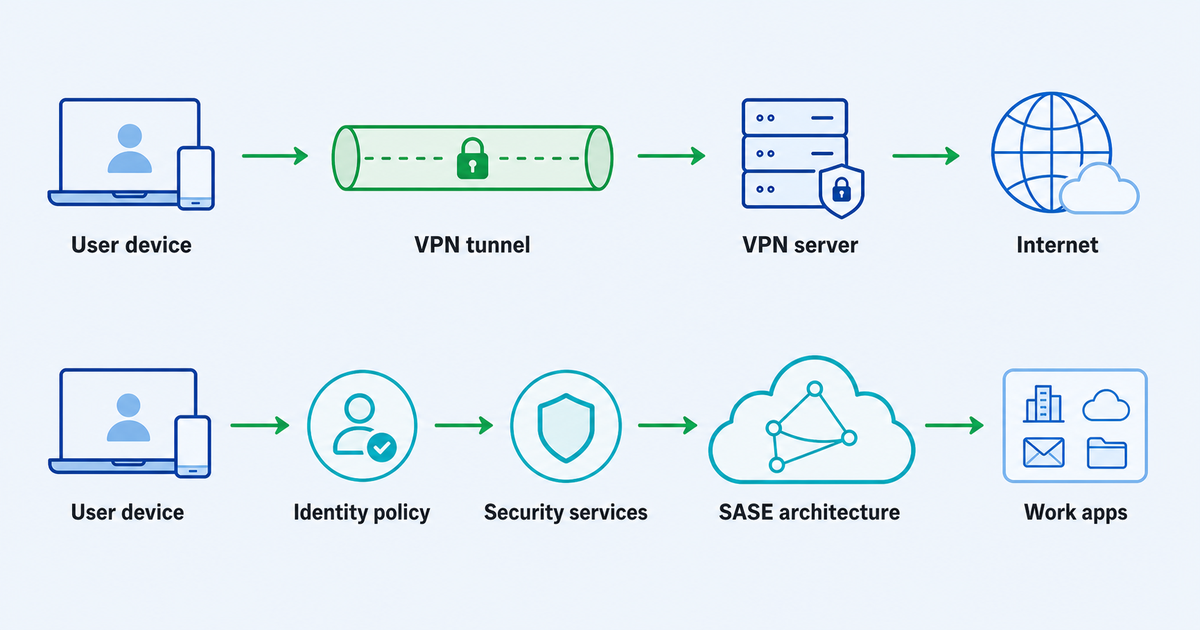
Small companies usually do not start with an access architecture. They start with a practical problem: someone needs to work from home, travel with a laptop, connect on hotel Wi-Fi, or reach a shared resource without exposing too much.
That is where a VPN often enters the conversation. It is familiar, understandable, and useful for many narrow remote-work and privacy needs. SASE, short for Secure Access Service Edge, comes from a different place. It is a broader model that combines networking and security functions, usually for organizations that need identity-aware controls, centralized policy, inspection, and a more mature way to manage distributed users and apps.
So the real vpn vs sase question is not “which one is better?” It is: what kind of access problem does your company actually have?
The Short Version: VPN Solves Connectivity, SASE Solves Access Architecture
A VPN creates an encrypted connection path between a user’s device and a VPN server or network. For a small team, that can be enough when the main goal is straightforward connectivity or a more private route on untrusted networks.
SASE is larger. It brings networking and security controls into a cloud-delivered architecture. Depending on the environment, SASE discussions may include concepts such as identity-aware access, secure web gateways, cloud access controls, firewall-as-a-service, software-defined networking, and zero-trust principles.
For a small company, the distinction matters because these are different operating models:
- A VPN is usually easier to understand and roll out for simple use cases.
- SASE usually fits companies that need more granular control over who can access which apps, from which devices, under which conditions.
- A VPN can be a practical layer for individuals and small teams.
- SASE is closer to a long-term access and security program than a single tool.
If your company only needs a simple encrypted connection for travel, remote work, or basic privacy, a VPN may be the right-sized choice. If your team is growing, your apps are scattered across SaaS and private systems, and broad network access is becoming uncomfortable, it may be time to think beyond a VPN.
When a Simple VPN May Be Enough
A simple VPN can make sense when the access pattern is narrow and the risk is easy to understand.
For example, a founder, consultant, agency lead, or small remote team may need a safer connection on public Wi-Fi, a consistent encrypted route while traveling, or a basic way to connect through a VPN server. In that context, the goal is not to build an enterprise security architecture. The goal is to reduce exposure in common situations and keep remote access manageable.
A VPN is more likely to be enough when:
- only a small number of people need remote access;
- users are trusted and roles are simple;
- the company does not run many sensitive internal applications;
- the main need is encrypted connectivity rather than app-by-app policy enforcement;
- there is no dedicated security team to operate a complex architecture;
- compliance requirements are limited or handled elsewhere;
- the business can tolerate a simpler administrative model.
This is where a product such as VPN Unlimited by KeepSolid can be relevant as a straightforward VPN option for users and small teams who need an encrypted VPN connection for everyday connectivity and privacy scenarios.
That does not make a VPN a complete answer to every security problem. A VPN does not automatically create identity governance, device posture checks, audit workflows, app-level segmentation, or zero-trust policy enforcement. If those are the problems you need to solve, the conversation has moved into a broader access model.
When the Access Problem Has Outgrown a VPN
The pressure to mature usually appears gradually. At first, one or two people need remote access. Then contractors need access. Then the team adds SaaS tools, private apps, shared admin panels, finance systems, client data, and personal devices. At some point, giving broad network access to everyone who connects through a VPN starts to feel too blunt.
That is when remote access security becomes less about the tunnel and more about control.
Signs that your company may need a broader architecture include:
- different roles need access to different apps or data;
- contractors should reach only one system, not the whole network;
- sensitive resources need stronger approval, monitoring, or segmentation;
- employees use a mix of managed and unmanaged devices;
- SaaS apps and private apps are both part of daily work;
- admin accounts need stricter handling than normal user accounts;
- the company is starting to face customer security reviews or compliance questions;
- troubleshooting access is becoming hard because policies live in too many places.
In that environment, the question is no longer “Do we have a VPN?” It becomes “Can we make access decisions based on user, role, resource, device, and risk?”
That is the territory where SASE-style architecture and zero-trust ideas become useful.
What SASE Adds to the Decision
SASE is not just a faster or more expensive VPN. It is an architecture pattern for bringing network connectivity and security controls closer together, often through cloud-delivered services.
The approved source material frames SASE as a way to combine networking and security functions for distributed users, remote locations, and cloud services. In practice, that means SASE is usually discussed when a company needs more than an encrypted path. It needs policy, inspection, segmentation, and centralized management across users and resources.
For a small company, the most useful takeaway is not a list of enterprise acronyms. It is this:
If everyone who connects should reach roughly the same things, a VPN may remain workable. If access needs to be different for each role, app, device, and risk level, SASE-style thinking becomes more relevant.
That does not mean a small company should rush into a complex project. SASE can require planning, operations, vendor evaluation, user training, and ongoing management. A company without the capacity to operate those controls can create confusion faster than it creates security.
The better approach is to treat SASE as a maturity direction. Understand what it is designed to solve, then decide whether your current access risks justify the extra complexity.
Where Zero Trust Fits
Zero trust is often mentioned near SASE, but it should not take over this discussion. For small companies, the most practical part of zero trust is the shift from broad trust to resource-focused decisions.
Instead of asking, “Is this person on the network?” a zero-trust approach asks more precise questions:
- Who is the user?
- What resource are they trying to reach?
- Does their role require it?
- Is the device acceptable for this resource?
- Should the session be allowed now?
- Should access be limited, reviewed, or revoked?
That is the heart of zero trust remote access: access is not granted just because someone is connected. It is evaluated around the user, the resource, and the context.
NIST’s zero-trust guidance is especially useful here because it frames zero trust as an architecture and migration path, not a one-click product. Small companies can use that mindset without pretending they already have a fully mature enterprise program.
Least Privilege Is the Practical Test
The phrase least privilege access sounds technical, but the idea is simple: people should get the minimum access they need to do their work, for as long as they need it.
This is often the clearest way to decide whether a VPN is enough.
Ask:
- If a team member connects through the VPN, can they see more than they need?
- Can a contractor reach only the one app they were hired to use?
- Are finance, admin, source code, or client-data systems separated from ordinary access?
- Can access change quickly when someone changes roles or leaves?
- Do you know which accounts can reach sensitive resources?
If those questions are easy to answer and your environment is small, a VPN may still be a reasonable fit. If those questions expose gaps, your remote access model may need to mature.
A Small-Company Decision Framework
Use this framework before choosing a direction.
1. List the resources people need
Do not start with tools. Start with resources.
Write down the apps, systems, files, admin panels, databases, and shared services people need to reach remotely. Separate everyday tools from sensitive systems. A simple VPN decision becomes much clearer when you know what is actually behind the access request.
2. Map users to roles
A five-person company may not need complex role design, but it still needs basic boundaries. Owners, employees, contractors, finance users, and technical admins usually should not all have the same reach.
If roles are simple and stable, VPN-based access may be enough. If roles are fluid, temporary, or highly different, you may need stronger policy controls.
3. Check whether broad network access creates avoidable risk
A traditional VPN can be very useful, but broad network-level access may be too wide for some environments. If a connected user can reach systems unrelated to their job, that is a design issue, not just a user-training issue.
SASE and zero-trust models try to reduce that implicit trust by focusing on resources and policy. Small companies do not need to copy enterprise architecture overnight, but they should notice when broad access no longer matches the business.
4. Look at device control
Device control changes the answer. A company with managed laptops, enforced updates, and clear ownership has a different risk profile from a company where employees and contractors use personal devices.
If device trust matters for your sensitive apps, a basic VPN by itself may not answer enough questions.
5. Be honest about admin capacity
Complex controls require care. Policies need owners. Exceptions need review. Users need support. Logs and alerts need someone to read them.
If nobody has time to operate a larger architecture, the company may be better served by a simple, well-understood setup while it documents risks and prepares for the next stage.
6. Separate today’s need from the next maturity step
You do not have to solve every future access problem this month. A small team can use a VPN for current needs while also preparing a cleaner access inventory, role map, and sensitive-resource list.
That preparation makes a later SASE or zero-trust project less chaotic.
A Practical Way to Think About Secure Remote Access
Secure remote access is not a single product category with one permanent answer. It is a set of choices about how people reach work resources from outside the office or trusted network.
For a small company, a sensible progression can look like this:
- Start with the access need: who needs what, from where, and why.
- Use a VPN when the need is simple encrypted connectivity or privacy for a small, trusted group.
- Add clearer rules for sensitive resources as the team grows.
- Watch for signs that broad access is creating risk or support overhead.
- Consider SASE-style architecture when identity, policy, app-level control, inspection, and operational maturity become the real problem.
The important part is to avoid buying complexity before you can operate it, while also avoiding a setup that gives people more access than their work requires.
VPN vs SASE: Quick Comparison for Small Companies
| Question | VPN may fit when… | SASE-style architecture may fit when… |
|---|---|---|
| Main goal | You need encrypted connectivity or a private route for common remote-work/travel scenarios. | You need centralized access policy across users, apps, locations, and risk levels. |
| Team size | The team is small and access needs are similar. | The team is growing, distributed, or includes contractors and multiple roles. |
| Resource sensitivity | Few internal resources are highly sensitive or segmented. | Sensitive apps, admin systems, client data, or regulated workflows require tighter control. |
| Access model | Broad access is acceptable for the current risk level. | Users should reach only specific apps or resources. |
| Operations | You need something understandable and easier to manage. | You have the capacity to manage policies, exceptions, monitoring, and user support. |
| Maturity path | You are solving a narrow connectivity/privacy problem now. | You are building a longer-term access architecture. |
Common Mistakes to Avoid
Treating SASE as just “VPN, but newer”
SASE is not simply a newer VPN label. It is a broader architecture. If a vendor or internal discussion makes it sound like a direct one-to-one swap, slow down and define the actual access problems first.
Expecting a VPN to do every security job
A VPN can be useful, but it should not be asked to replace identity policy, device management, app permissions, monitoring, staff offboarding, or sensitive-resource segmentation.
Buying architecture before the company can operate it
SASE-style programs require ownership. A small company should not adopt a complex access model without knowing who will manage policies, support users, review exceptions, and keep the setup current.
Ignoring the simple use case
Some teams really do need a simple VPN. If the current need is narrow, the access surface is limited, and the team understands the setup, a VPN can still be the practical choice.
FAQ
Is SASE always better than a VPN?
No. SASE is broader than a VPN, but broader does not automatically mean better for every small company. If your need is simple encrypted connectivity for a small group, a VPN may be enough. If your access needs involve identity-aware rules, app-level control, multiple user roles, inspection, and centralized policy, SASE-style architecture may be worth evaluating.
Does zero trust mean no VPN?
Not necessarily. Zero trust is an architecture approach focused on reducing implicit trust and making access decisions around users, resources, and context. Some organizations modernize access in phases. The useful question is not whether a VPN exists, but whether access is limited to what each user and role actually needs.
Should a small company start with SASE?
Only if the access problem justifies it and the company can operate it. Many small companies should first document users, resources, sensitive systems, device control, and role boundaries. That work clarifies whether a simple VPN is enough or whether a broader architecture is needed.
What is the biggest risk of relying only on a VPN?
The main risk is not the word “VPN.” It is overly broad access. If connecting through the VPN gives users more reach than their work requires, the company may need better segmentation, role-based permissions, and resource-level controls.
What should we do before changing anything?
Make an access inventory. List users, roles, devices, apps, sensitive resources, and current remote-access paths. Then decide whether the problem is simple connectivity or a broader access-control issue.
Bottom Line
The vpn vs sase decision is really a maturity decision.
Use a VPN when the company needs a straightforward encrypted connection for a narrow, manageable use case. Start thinking about SASE when the company needs identity-aware policy, app-level control, security inspection, and a more organized way to manage access across users, devices, and resources.
For small companies, the best answer is usually the one that matches the current risk and the team’s ability to operate it. Keep the setup simple when the problem is simple. Plan for a broader architecture when remote access has become a policy, resource, and operations problem.